I’m trying to use the new elements instead of the classic elements but it’s been an exercise in frustration so far. I’m seeing large margins/padding between sections even though I’ve set all the margins and padding for elements, columns, rows & sections to 0. I’ve even tried setting the top margin of the second section to a negative number. That used to work in Cornerstone with the old elements but it does not now.
Here’s an example of the problem:
http://lagunawoodsdemocrats.org/december-2017-holiday-party
The two sections both have borders so you can see where they start & end. With the borders the margins don’t look too bad but I don’t actually want borders because the two sections are part of the same content. Removing the borders leaves a large amount of whitespace between the bottom of the first section’s content and the top of the second section’s content. That visually disconnects the two sections and looks bad.
That extra whitespace is what I’m trying to remove but there doesn’t seem to be any easy way. Looking at the CSS I see a 1.5 em bottom margin on the first section along with 45 px of padding.
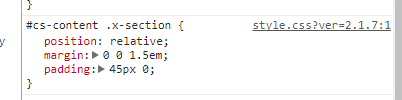
This is what I don’t understand. Why should there be so much whitespace? And why can it not be removed using the margin & padding controls for rows or sections? Again, using negative margins now does nothing.

