How to Re-Create This From Demo

I am looking to re-create this look from the demo page showing off cornerstone. I have I set up on my site currently, but I can’t seem to figure out two things

1 - how did they get the location icon to glow?
2 - how did they get the circles to slide in from the left? I don’t see a place to allow them to fade in.

Thanks!

My site is www.bravepandacreative.com and the site I saw this from was https://theme.co/cornerstone/elements/

Hi Brock,

1 - how did they get the location icon to glow?

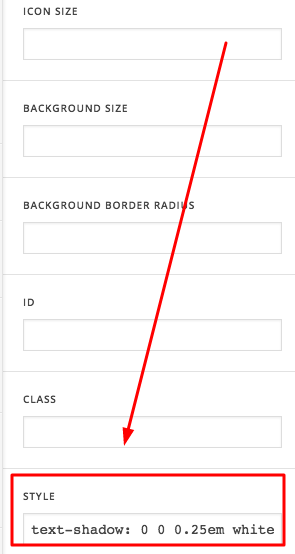
This uses an icon element. To make it glow, we just added a text shadow, by adding this code in the style field.

text-shadow: 0 0 0.25em white;

2 - how did they get the circles to slide in from the left? I don’t see a place to allow them to fade in.

The circles are also an icon element placed on separate rows with one column.

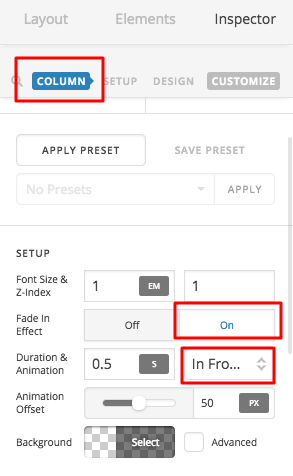
To make it slide in from the left, you need to enable column fade in effect

Hope this helps

Thanks for your reply! I got the location icon to look like it does in the demo!

As far as the circles fading in, I think that’s the issue - I don’t see the option to “fade in effect” on the row. Any suggestions?

Hi Brock,

The fade in effect is in your column element and not in your row element.

Please check screenshot.

Thanks

Got it!! Thanks

You’re welcome.

This topic was automatically closed 10 days after the last reply. New replies are no longer allowed.