how can I overlap elements like this 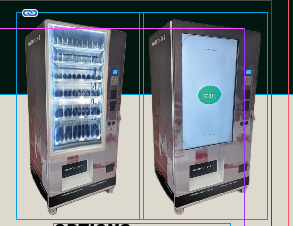
Hi @wicara,
Thank you for writing in, but the password you provided is incorrect, please confirm.
And please clarify what you’re trying to do, the screenshot you provided does not explain what you’re trying to do.
Cheers!
see behind the images I would like to overlap the elements like that
Hello @wicara,
Thanks for updating the thread.
Can you please confirm the password as shared password is incorrect. Along with that will it be possible for you to share the website URL from where you took the screenshot? That way we can have a better understanding of the changes you are looking for and accordingly we can guide you in right direction.
Thanks.
This topic was automatically closed 10 days after the last reply. New replies are no longer allowed.
added new information please see
Hi @wicara,
That is possible with a negative margin, please add a CLASS negative-top-margin to your Block Grid element, then add this to the Page > CSS
@media (min-width: 768px) {
	.negative-top-margin {
		margin-top: -100px;
	}
}
Feel free to adjust the -100px as you see fit, the reason why we are doing it with a @media CSS query is so it does not affect the mobile responsive view.
Hope it helps,
Cheers!