How to only have one Graphic Icon for your header

Hello,

I am having an issue with the Graphic Icons. I am setting up a Cart with a Cart image. When I set up the Cart Image it also has graphics Icons for all the other Top Links for Instance “My Account” “Shop” "Gallery “Home Page”. I have tried looking at the Menu building to find a way to turn of individual top links Icons with no success. I only want to have one Graphic Image strictly for the cart.

Header Top’s Links Graphic Icon
Hi @scuur,

Thanks for writing in! To assist you with this issue, we’ll first need you to provide us with your URL. This is to ensure that we can provide you with a tailored answer to your situation. Once you have provided us with your URL, we will be happy to assist you with everything.

Thank you.

http://165.227.81.224/cart/

As you can see when you click on shop there are multiple icons for each top link. I would like only one for the cart not a icon for my account and shop.

Hi there,

Please double check the menu settings in Appearance > Menu then make sure that the other menu items do not have an icon assigned to them.

In case the issue persists, please provide us with the admin details of your site in a Secure Note.

@Jade

Thank you Jade
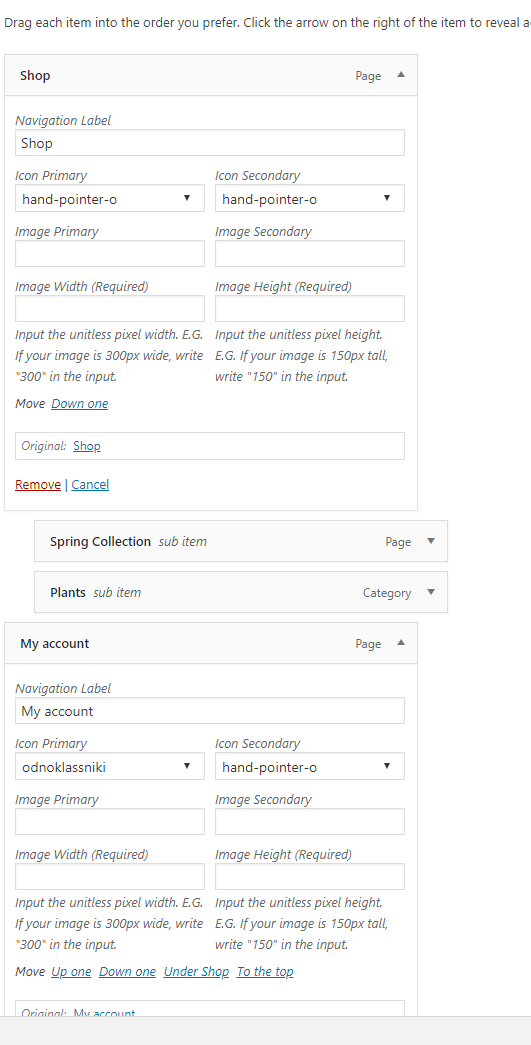
They all have something applied to them in the Appearance > Menu. I’m not sure how to deselect the Icons. I’ve searched and there no option. Heres an Image.

Hi There,

There is no option to have only one graphic on the header.

You can instead use an image or icon tag on the navigation label beside the name SHOP but deactivate the graphic feature on the header builder.

Hope it helps

This topic was automatically closed 10 days after the last reply. New replies are no longer allowed.