How to Move Image in Column?

I want to move an image in a column up and to the left so that it’s in line with the text next to it, but I can’t figure out the CSS to do it:
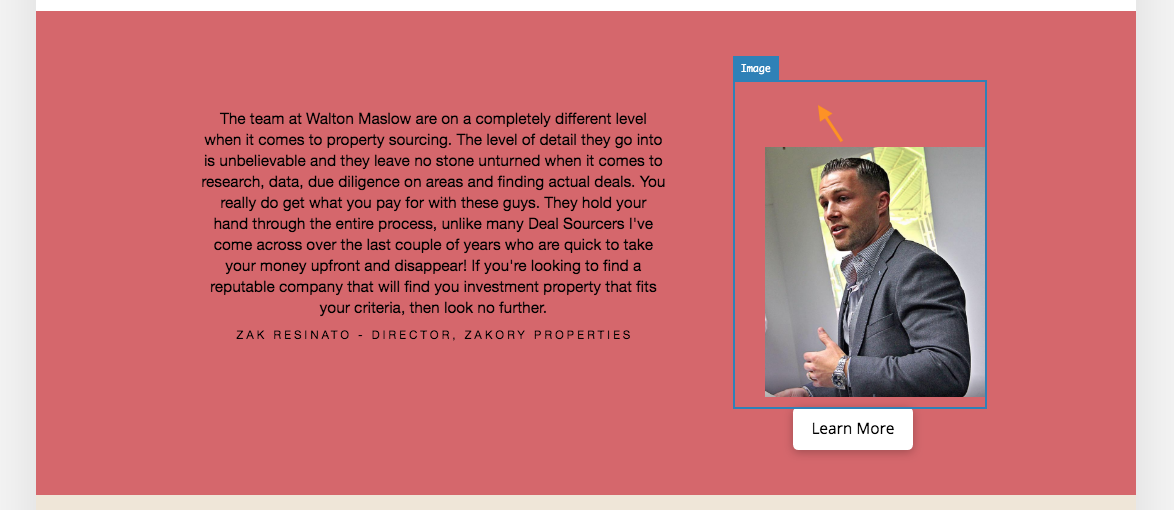
I’ve tried this CSS but it’s not working:
[class*=“testimonialimage”] {
padding-top: -80px;
padding-bottom: 10px;
padding-left: 30px;
}

The page it’s on is here: www.waltonmaslow.com/investors-new

Thanks in advance!

Hey Jonathan,

Please try this code:

.testimonialimage {
    padding-top: 0;
}

.testimonialimage img {
    padding-top: 50px;
}

Hope this helps.

Hi Jade,

Unfortunately, that did the opposite of what I’m trying to do! I’m trying to move the image up and that pushes it down further…
Anything else you can suggest, please?

Also, do you have any idea why the top of the page is messed up? The menu bar suddenly got fatter (above the text) and there’s now a gap above the slide. If you wouldn’t mind having a look at that too, it’d be greatly appreciated: https://imgur.com/Fznphri.

Thanks

Hello Jonathan,

I can see you have figured this out by adding this:

.testimonialimage img {
    padding-top: 0px;
}

Usually, that CSS is not needed. It happens because you have this custom CSS that add 65px top padding:

[class*="image"] {
    padding-top: 65px;
    padding-left: 30px;
}

That same CSS is the root cause of gap on top of the page. It adds padding on all element once there a class includes image in it. Since you do have jetpack lazy load image enabled, that add a certain class like jetpack-lazy-images-js-enabled, that CSS works. See this: https://screencast-o-matic.com/watch/cqjihsOswd. Please try to remove that CSS.

Hope this helps.

This topic was automatically closed 10 days after the last reply. New replies are no longer allowed.