How to modify the URL link from Page Buttons?

Hi there,
I changed the Text in the Menu options, for example where it said " Our Story", I modified it to “Our Mission”
Now and when I navigate from the webiste , in the path top appears “https://vrhealth.health/our-story/” and I need to modify it to" https://vrhealth.health/our-mission/". Please see the picture to understand better it


Sorry for my ignorance but Could you teach me to modify it?
Thanks for your time and support
Best Regards
Alejandro
Hey Alejandro,

What you need to change is the Page Title. Our theme does not have control over it so you need to learn WordPress basics. You can check this 3rd party article for this matter.

Hope that helps.

Hey @christian
Sorry, I did not know about it.
I will looking at the link that you share with me.
Thanks
Alejandro

Hello Alejandro,

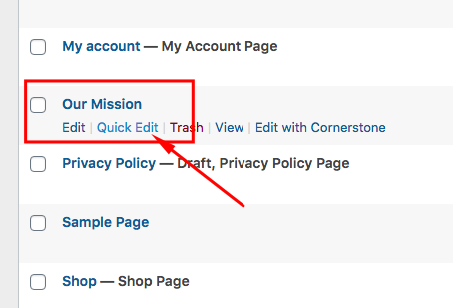
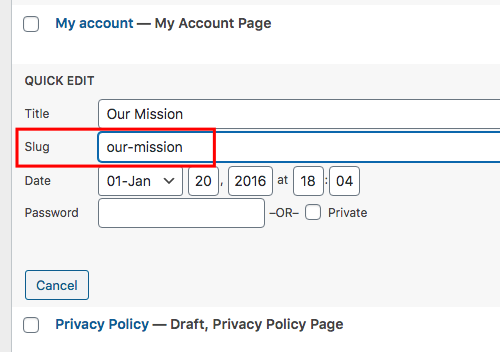
Or you can use Quick edit for the page details. Please go to Dashboard > Pages and hover over the Our Mission page.
UBLjGctETialqYXarLy8zA

Click quick edit to change the page slug.
qcfyAaZ1Tim_Kxl9wynj_A

Hope this makes sense.

Hi @ruenel
One more time, thanks for your help and understand that I am new in this topic…
Best Regards
Alejandro

You are most welcome!

This topic was automatically closed 10 days after the last reply. New replies are no longer allowed.