How to make sections fullwidth?

Hi,

I’ve been using pro for about a month and there’s one thing I really can’t edit…
Its a white border around all the sections that i make or have.
I would like to make all my content in black boxes and be able to use all the place of my website, not only in sections in the middle…
So the question is:

How do I make my sections full with and height so I can use the full page?
Screenshot of the problem

Hi @Empowered,

Thanks for reaching out.

That could be the margin or padding of your section. But I can’t confirm it since it’s behind a coming soon page. And it could be due to the section’s inner container too.

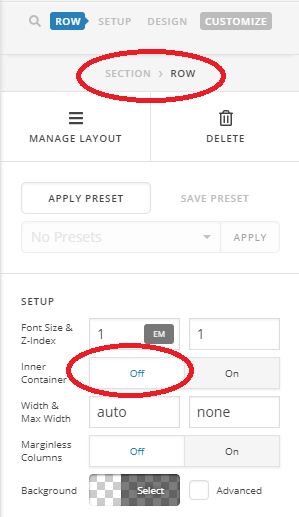
Please inspect your section row and turn off its inner container, then check if there are margins and paddings, then set them to zero.

Thanks!

Hey, thanks for answering!
The inline container was already off and Margins and Paddings are at 0
except margin right and margin left, they say auto…
Also I can’t find how to put a button in the middle of the “row”,
So…
I’m stuck

Hi @Empowered,

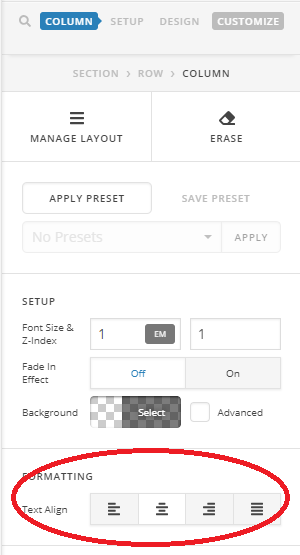
In that case, would you mind providing the exact URL where this issue is present? As for the button, please try the alignment option of the row or column.

If your button has float styling, then alignment will not work unless you remove that styling.

Thanks!

Its at the homepage
http://www.empoweredshop.com/
I’ve put out the coming soon page,
Also solved the button, thanks for that
Im just putting in the structure right now
Daniel

Hi @Empowered,

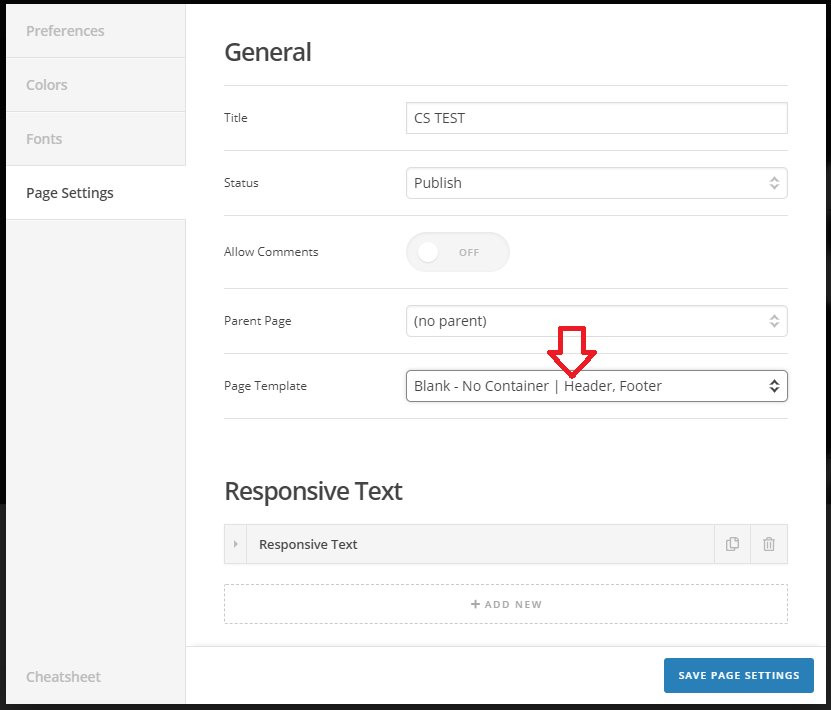
Ah, you have to change your page template to Blank - No Container to achieve absolute full-width ignoring the container’s restriction.

You can do that by clicking the cog icon in the builder and choose the template like in this screenshot.

Thanks!

Yes! It worked! Thanks for helping me out!

you are most welcome!

This topic was automatically closed 10 days after the last reply. New replies are no longer allowed.