I used to be able to easily make section backgrounds the full size of an uploaded image. Now, since the update, I can’t figure out how to make the section full width and height. Here’s an example of what keeps happening. The first image is what I want to be full-width. https://www.draperystreet.com/woven-wood/
Hello There,
Thanks for posting in! I have inspected the page and I could not see a background image. You have instead added an image element in a one column row. Please keep in mind that the column width is dependent with the row width. The row width has two options. You can have a fullwidth row which has the same width as the section or the row with maximum width which was set in the global settings. You can see this settings in the row settings by enabling/disabling the "Inner Container" option.
Hope this helps.
Correct. It doesn’t work as a background image for the section, so I added it to the column as an image element. I need to know how to add it as a background image that fills up the entire section.
Hey @PunchBugIndy,
I see that Inner Container is enabled in your row settings so the image could not span the fullwidth of the section. Inner Container must be off.
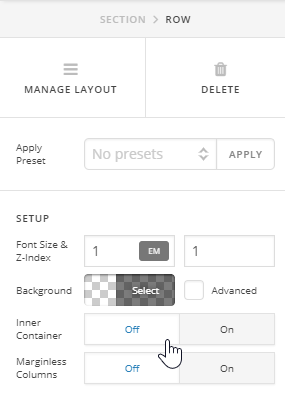
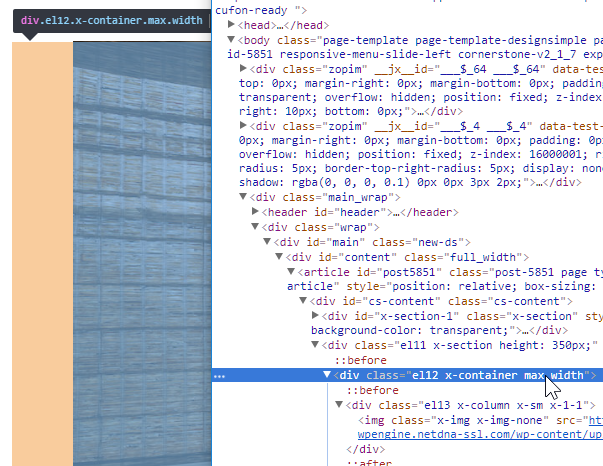
I see you’re only using Cornerstone for this site. Your theme’s content has a specific width and the section’s width is limited by its container. With that said, it is not possible for the image to span fullwidth because of the limitation of your theme.
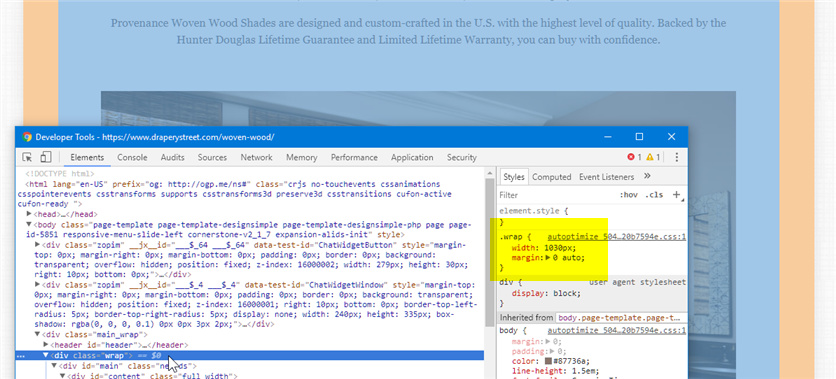
Also, if you wish to show all parts of the image, you should not use it as a background. Your setup is currently fine. Just disable the Inner Container setting in your Row’s settings.
Thanks.
Thanks, Christian. The inner container setting was the issue.
You’re welcome.
This topic was automatically closed 10 days after the last reply. New replies are no longer allowed.