I’ve seen websites add images to their headers or footers that look very appealing. Here are two examples:

also:

is it possible for me to replicate this? If so, how?
I’ve seen websites add images to their headers or footers that look very appealing. Here are two examples:
also:
is it possible for me to replicate this? If so, how?
Hi There,
That can be done with negative margins.
Please provide your url and explain in detail your goals so we can help.
Thanks!
I’ve attached an example of a page that contains a header & a footer. I’ve also attached a link to a header that is editable in the secure note:
Hi there,
I went to the Header section of the ecommerce-2 page and selected the green Free Audit button. In the margin option of that button I added 50px top margin:
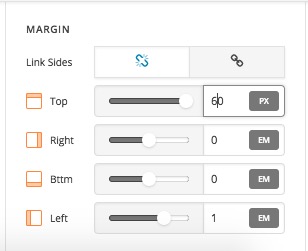
Now if you check the result it is like the one you want and mentioned in the original question:

Thank you.
@christopher.amirian
Okay i think i have it figured out. Only if i select a footer for “all pages” and i go to preview it, it will preview on a page i’ve selected to have no footer in the page settings but will preview with the footer anyways - thus leaving me with now footer/header to preview.
How can i avoid this?
Hi There,
Could you elaborate the issue further in order that we understand how to replicate and how to fix it?
Thanks!
This topic was automatically closed 10 days after the last reply. New replies are no longer allowed.