Hi guys,
Is there anyone who would be able to tell me how to hide the lines that are below each button on my navigation bar?
I have attached an image that shows what I mean.
Thank you for reading this!
Tracy
Hi guys,
Is there anyone who would be able to tell me how to hide the lines that are below each button on my navigation bar?
I have attached an image that shows what I mean.
Thank you for reading this!
Tracy
Hi there,
Thanks foe=r writing around! Can you please share the URL of your site so we can take a look?
Thanks!
Hello @TracyWake,
Thanks for asking. 
You can add following CSS under X > Launch > Options > CSS to remove navigation lines:
.x-navbar-fixed-left .desktop .x-nav>li>a:before, .x-navbar-fixed-right .desktop .x-nav>li>a:before{display:none;}
Thanks.
Hi Prasant - Thanks for sending me this message.
The above CSS centers the buttons and horizontal lines. This is not what I want! I need the text in the buttons to stay justified to the left and the lines, in between the buttons, to disappear.
Any ideas?
Tracy
Hi Tracy,
The code previously suggested should have this result:
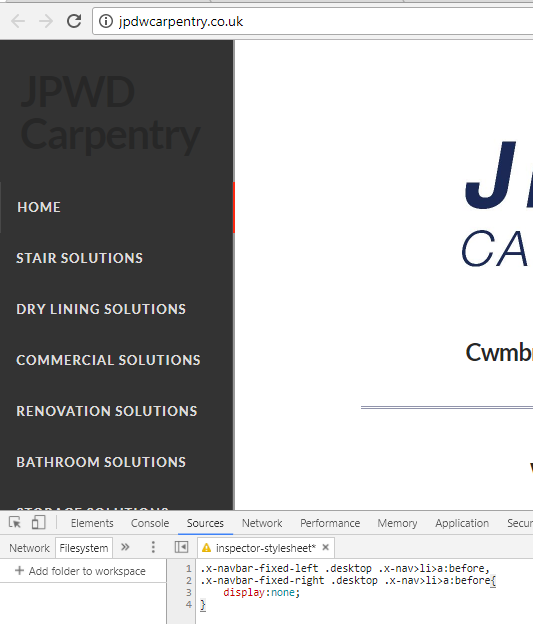
where the horizontal lines between the menu items should be removed which is what you are aiming to do.
Kindly make sure you are copying the correct CSS that that provided.
Thank you.
Thank you Jade,
I was putting your CSS in the wrong place. it’s in the correct place now and has worked like a dream 
Thank you again,
Regards,
Tracy
You’re more than welcome, glad we could help.
Cheers!
This topic was automatically closed 10 days after the last reply. New replies are no longer allowed.