Hi There,
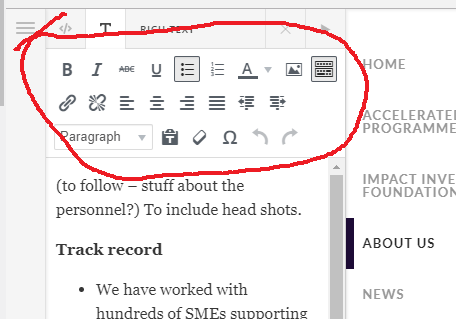
Is there a way of adding more editing buttons to the editing area in Cornerstone. I would like to choose the option of adding different sized fonts and other things - it appears to be a bit restrictive.
Thank you for reading this!
Hi There,
Is there a way of adding more editing buttons to the editing area in Cornerstone. I would like to choose the option of adding different sized fonts and other things - it appears to be a bit restrictive.
Thank you for reading this!
Hey @TracyWake,
Regretfully, no. What you see in there is also what WordPress offers out of the box.
To change the font size, custom code is needed. Here’s one trick I could share with you to achieve this a little bit easier. Select a text and change its color. Then, switch to the HTML editor and change the color inline style to font-size and then change the value to an number followed by an em or rem based unit for responsive text or a px based unit for a fixed size. To see this clearly, watch https://youtu.be/JH4fmNWsx1Q
Hope that helps.
Hi Christian,
Thank you for getting back to me so quickly!
I have been looking at the plugin Tinymce-advanced Do you think this plugin will work with Cornerstone. I have used this plugin with other WordPress websites, but never with Cornerstone. Tinymce-advanced has much more options for editing and making text look eye catching!
Tracy
Hey Tracy,
Regretfully, that won’t work. There is currently no way to add additional controls in the Visual Editor in Cornerstone.
Hi Christina,
It’s a shame that something as simple as setting a font size isn’t possible. Do you think Themeco are working on this issue?
Regards,
Tracy
Hi @TracyWake,
Some features in the text editor’s toolbar are intentionally removed to prevent conflicts. Hence, we wouldn’t see advanced TinyMCE being implemented in the cornerstone.
Cornerstone has elements with built-in font setting, like the headline, text element, and so on. You can divide that content in multiple elements that each has different font setup.
Example,
(to follow - ...... )
Track Record
Though, if you intended to change the color per word, then yes, you may use the workaround provided by Christian.
Thanks!
Hi Guys,
Thank you for the above info. This will help me with what I am trying to achieve.
Tracy 
You’re most welcome!
This topic was automatically closed 10 days after the last reply. New replies are no longer allowed.