How to have full width blog posts on Ethos

Hi, I have the Ethos installed on my website www.keepcalmandtravel.com and I just now realized that there isn’t the option to chose the layout as you have for the pages (full width, sidebar on the left or right and so on).

Is it possible to alter the code and give me that choice? I like some blog posts to be full width and I want them to show up on my blog as regular posts even if they look a bit more like “static pages” as it’s important for my marketing strategy.

Thank you!
Hi Clelia,

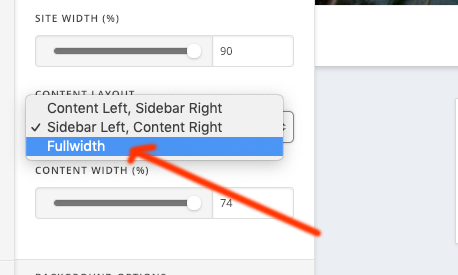
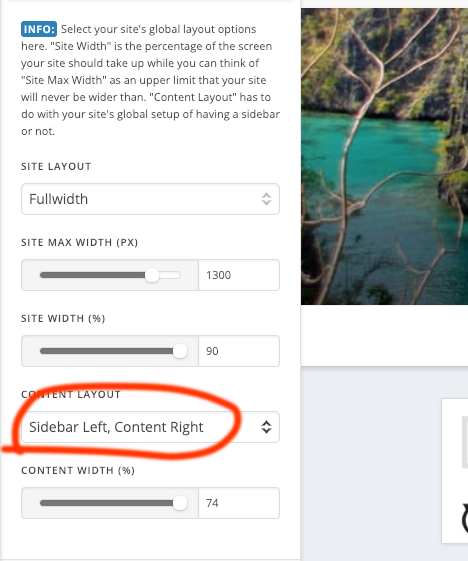
Thank you for writing in, yes the posts has no template option, but you can change its layout to Theme Options > Layout and Design > Content Layout

If you want a no container full width look, please add this to Theme Options > CSS

.single-post .x-container.max.width.offset {
	width: 100%;
}
.single-post.x-comments-area {
	padding-left: 60px;
    padding-right: 60px;
}

You said you installed Ethos, but I am seeing Integrity, are you working on a different site? Please clarify.

Cheers!

Oh sorry, you are right. I have 2 websites and www.keepcalmandtravel is definitely with Integrity!

I updated the theme yesterday but I was working with WPML and there were several issues so I had to revert to the previous version of X Theme.

Now I’ve tried to add the code to theme/options but it doesn’t even work and I’m not sure the code is the best option because how can the theme tell when I want a normal post or a full width one?

I will leave you my login credentials in case you want to have a look for yourself (remember that I didn’t update the theme because it was giving me issues with WPML yesterday and I want to resolve that too but I wanted to open a separate ticket for that)

Thanks!

Hi Clelia,

Thanks for the details!

I can still see your content layout is left sidebar and right content.

The code only works if you choose it to be full width.

Hope this helps!

Thank you

I think I don’t understand where you are looking can you please give me the path to get to the screenshot images?

What i did was going to the backend to my X then click on theme options and add the code to the css.
I didn’t see any of this. Is there a way to send me a quick recording or something? maybe it’s better to see where you go and what you do and we can both save a lot of back and forth emails :slight_smile:
Thanks!

PS
Maybe i got it, did you go to design and layout? if I change that setting… wouldn’t it change ALL my blog posts into full width? My original question was simply to have the option to choose (as I can do for the pages) if a blog post is going to be full width or not. I didn’t want all my blog posts to be full width.

Hello Clelia,

Thanks for updating the thread.

Yes, you can get the options under X > Theme Options > Layout and Design > Content Layout. Having said that, choosing full width under Content Layout will change the layout of all the blog posts. However, you can individually select whether or not you want the post to be full width.

Please note that do the changes post needs to be opened in Cornerstone. After that click on the settings cog icon and under Posts settings > Meta Settings toggle Fullwidth Post Layout and save the changes.

Please note that if the post was not created using Cornerstone and upon saving the changes, content and layout may get affected.

Thanks.

This topic was automatically closed 10 days after the last reply. New replies are no longer allowed.