How to get Silvertooth Agency header into Header Builder

Is there a way to get a default header (like the one used in Design Cloud, in the Silvertooth Agency site) into the Header Builder? And/or a way to get at the elements in the default header other than through the Theme Options (the bars and/or nav)?

Thanks,
Dave
Hey Dave,

Thanks for reaching out!

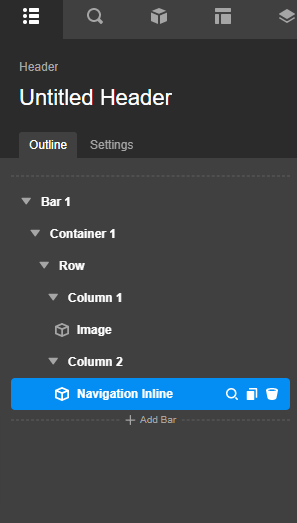
There’s no automatic option to get the Slivertooth Agency header into the header builder. What you can do is to replicate the header layout. You just need to add a bar in your header, then inside your bar container, you will create a row with 2 columns. The setup should be like this:

I am not quite sure If I understand correctly your second problem, would you mind sharing more information?

Thanks.

Hi, thanks, it’s just that the only way to modify the default header that ships with the Silvertooth site is to go into Theme Options, which doesn’t really allow much editing

Hi Dave,

It is still not clear about the question you had, but you can modify the Header using the Header Builder as shown by my colleague. If you still need any further assistance, please elaborate on the matter a bit more.

Thanks

This topic was automatically closed 10 days after the last reply. New replies are no longer allowed.