How to get rid of margins on pages

using integrity, got 100% width of website. set the background to white, but still have the “edges” showing up like a piece of paper sitting on something. ??
I would like to put an image/ad right below the menu/header and above the content on the actual page.
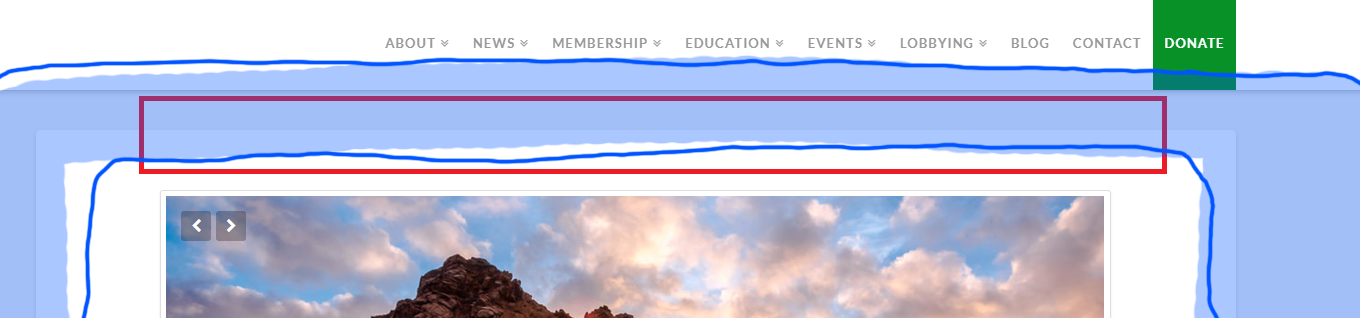
I would like to put the above mentioned image(s) in the red block space.

the blue space shows the “paper edges” in question. How do I remove these so it just looks like one flush white background?

Hi @norml,

Thanks for writing in.

Not sure how to replicate your setup or if I replicate your setup, I am not sure if it is the same one. Please share us the URL of your site we could suggest the best CSS code to remove the extra box shadow and margins.

Thank you so much.

https://montereycountynorml.org/test2/

this is the page. but all pages look like this.

Hi @norml,

Thanks for the URL.

Add this in your custom CSS:

.entry-wrap{
    box-shadow:none;
    padding-top:0;
} 

.x-container.offset {
    margin-top:0;
}

Hope it helps.

Let us know how it goes.

Thanks.

ah, thank works! thank you. any idea how to get the whole thing to go full width though. now without those lines, i am noticing how skinny (lots of side white space) vs “fatter/resize to browser window size”.

any suggestions?

Hi There,

Please use the Blank - No Container | Header, Footer page template on your pages.


Hope that helps,
Cheers!

This topic was automatically closed 10 days after the last reply. New replies are no longer allowed.