How to get blocks like "About Us" page on Non-profit demo?

Hi,

Trying to add three blocks like this: (here’s the link to the full page: http://demo.theme.co/nonprofit/about-us/) to a page on the website I’m currently building.

What element is this/how is this made?

I don’t want to install the theme content because I’m worried it’ll mess up my settings.

Thanks in advance
Hi Jonathan,

Thanks for reaching out.

For the first column, it can be just standard content (an image, a link, a text, and a button). The second column has two feature box elements separated by line element.

And the first column has this custom CSS,

.about-first-col-border {
    border-right: 3px solid #cccccc !important;
}

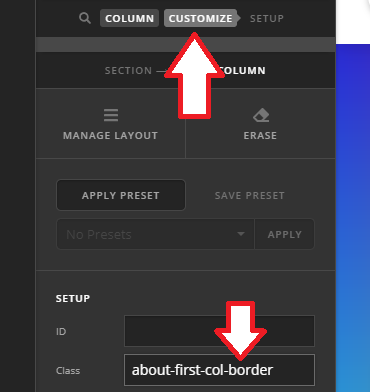
Which you’ll have to inspect the first column and add about-first-col-border to its Class option.

Thanks!

This topic was automatically closed 10 days after the last reply. New replies are no longer allowed.