Hi There,
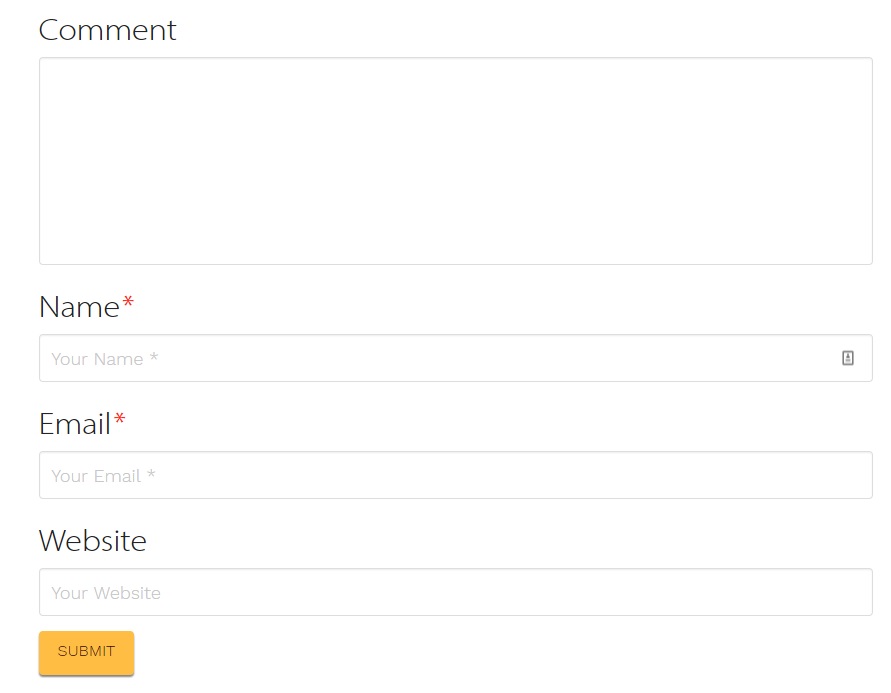
Is there anyway I can make my blog commenting form (1)
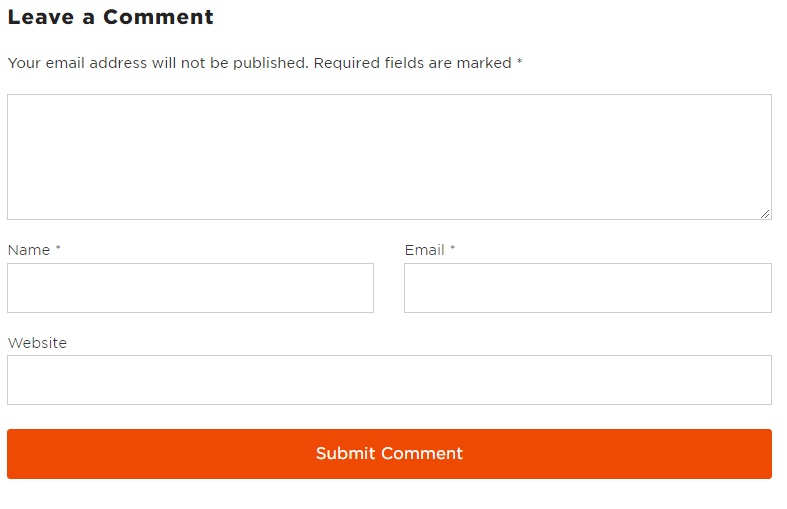
Look more like this blog commenting form (2)
Website is a dev server here > http://wordpress-168839-605971.cloudwaysapps.com/
Many thanks
Dan
Hi There,
Is there anyway I can make my blog commenting form (1)
Look more like this blog commenting form (2)
Website is a dev server here > http://wordpress-168839-605971.cloudwaysapps.com/
Many thanks
Dan
Hello Dan,
Thanks for writing in!
Do you want something like this?

If that is the case, please add the following CSS code in the X > Theme Options > Global CSS (http://prntscr.com/evui3r)
@media(min-width: 979px){
  #commentform .comment-form-author,
  #commentform .comment-form-email {
    width: 48%;
    float: left;
    margin-right: 4%;
  }

  #commentform .comment-form-email {
    margin-right: 0;
  }

  #entry-comment-submit {
    width: 100%;
  }
}
We would loved to know if this has work for you. Thank you.
Hi,
That worked absolutely great, thanks so much.
How could I change the wording on the ‘submit’ button?
Many thanks
Dan
Hi again,
To change the submit button text, add the following code in the Theme Options > JS:
jQuery(document).ready(function($){
	$('.single-post input.submit').attr("value", "Your Text Here");
});
Don’t forget to clear your browser’s cache after adding the code. Let us know how this goes!
This topic was automatically closed 10 days after the last reply. New replies are no longer allowed.