Hi
I am trying to edit the Entradas Pictures and I cannot find them…
Please see the picture example

Could you say me where are them to edit?
Thanks for your time
Best Regards
Alejandro
Hi
I am trying to edit the Entradas Pictures and I cannot find them…
Please see the picture example
Hello Alejandro,
Thanks for writing to us.
It seems that the image is coming from the post featured image. To remove the image or change the image please follow these steps
Go to Posts
Select the specific posts that you want to change or remove the image
Click on Edit
Click on the Settings
Scroll down to Featured image
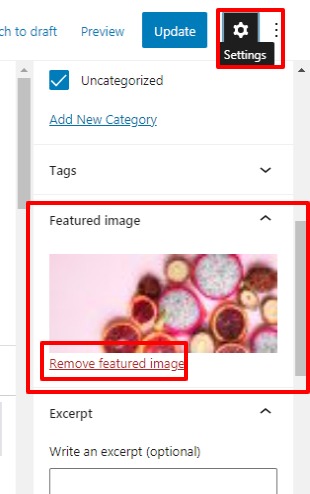
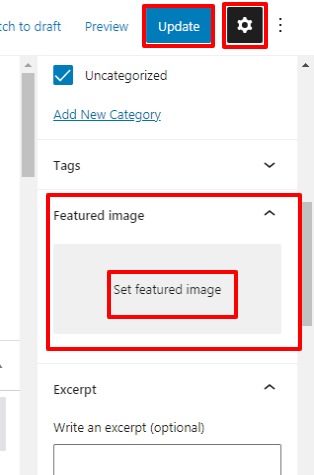
Click on “Remove Featured image”. After removing the image Click on the Update button.
When you click on the Remove Featured image button it removes the image and the button would convert into “Set Featured Image” button, by clicking on that you can set an image for the post.
Thanks
You are most welcome.
This topic was automatically closed 10 days after the last reply. New replies are no longer allowed.
