How to edit content on home page in Pro?

I have a new install of Pro but I can’t figure out where to add content to the home page. I don’t have a “home” page, but right now I have a custom header, blog entries, and a footer. I can figure out where to edit the header and footer but not the content on the home page.

Thanks!

Hi @quantazelle,

Welcome to Pro :slight_smile:

I believe that the content showing is your blog posts.

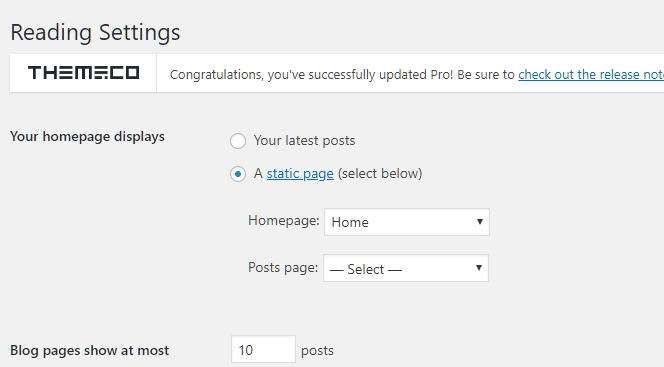
In your Settings > Reading > Homepage display, you will be able to know which page you are going to edit. You can also assign a page which homepage you want to edit.

If you want to show blog posts on your homepage, you can edit your blog homepage in your Pro > Theme Options > Blog

Hope it helps.

Let us know how it goes.

Thanks.

1 Like

This topic was automatically closed 10 days after the last reply. New replies are no longer allowed.