Hello SpiceManagement,
Thanks for writing in!
Menu Drop down that pushes down the content is only available in the mobile menu of the default header if you are using Pro theme and the mobile menu of the X theme. Regretfully there isn’t any available menu element that behaves like that at the moment. The menu dropdown element will only give you drop down menu. This do not push down the content downwards. With a custom css, you may be able to do a push downward by using this custom css:
.x-menu.x-menu-dropdown {
    display: none;
    position: relative;
    visibility: visible;
    opacity: 1;
}

.x-menu.x-menu-dropdown.x-active {
    display: block;
}
Please note that issues that might arise from the use of custom code and further enhancements should be directed to a third party developer.
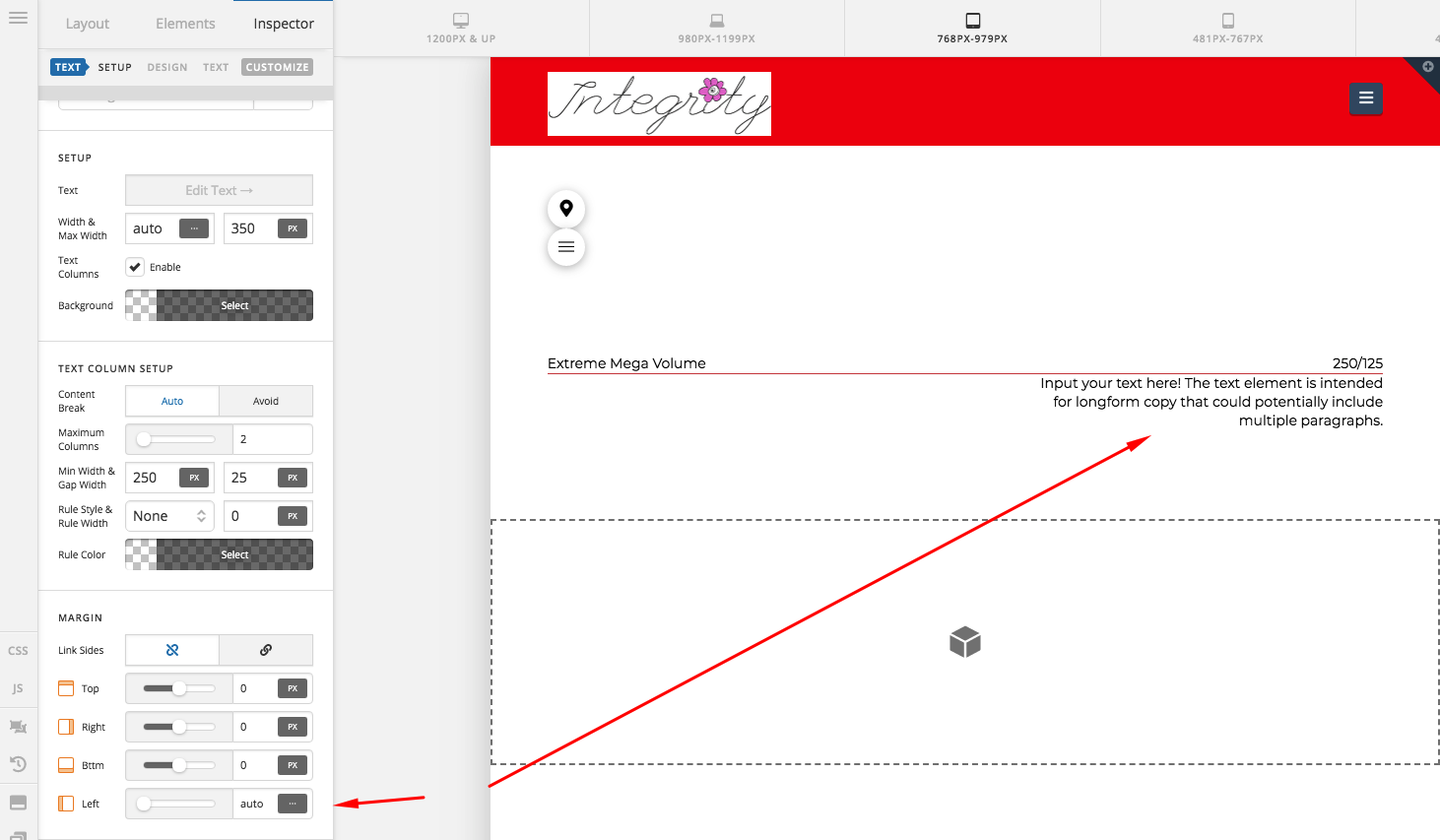
With regards to the pricing menu, you do not need to have columns. Simply insert a headline element and use this as a text for example:
Extreme Mega Volume <span class="right">250/125</span>
<span class="right">{price}</span> is needed so that the price will be aligned to the right while the rest of the headline text is on the left side. You may then add a bottom border in the headline element. In my screenshot below, I am using a headline element and the text element. For the text element, I set a maximum width of 350 pixels, aligned the text to the left and set the right margin to 0 while the left margin is in auto to make sure that the text element will be position to the right most of the page.
Hope this helps.


