How to disable this part “Data” and " Topics " , using theme options ?

Thanks
Hi @EDIT_workshop,
Thank you for writing in, is that the page on the link below? I can’t find that “Data” and " Topics " text page anywhere on your page. Please provide us the direct link where we can see the issue.
Cheers!
Have provide to you.
Thanks
Hey @EDIT_workshop,
Thank you for providing the URL. You can turn off the Post Meta via Theme Options > Blog > Content > Post Meta (see screenshot)
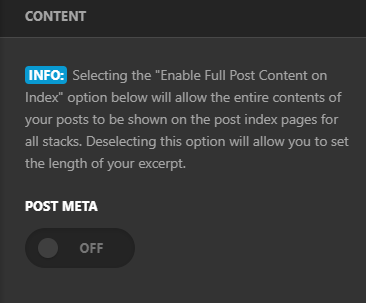
Removing the title would require custom CSS as this is not a theme feature by default and is outside of our support scope, but we will do our best to help you getting started with the customization but we will not be able to implement it. You can try adding the following code in the Theme Options > CSS:
.single-post .entry-header {
    display: none;
}
Please note that the code provided above serves as a guide only and is to help you in getting started so implementing it and maintaining the code will be out of our support scope and for further maintenance for new possible versions of the theme that may cause the customization to break, you will need to hire a developer.
Hope this helps!
Thanks your big help. 
Hi @EDIT_workshop.
Yes, that is a post meta, it should be hidden when you turn OFF the Post Meta option under Theme Options > Blog
If you turn it Off and it still showing up, please clear all the caching plugin/features you might have.
If the issue persists, please provide us login credentials in a secure note so we can take a closer look.

Cheers!
This topic was automatically closed 10 days after the last reply. New replies are no longer allowed.

