How to Customize Blog Heading Text Style

Our Japanese site uses custom font, and one issue with it is on certain headings the top of the characters cuts off.

I’ve been able to fix it across the site by adding line-height: 1.5; to the style of the affected headings.

The issue is also present for the Blog headings on eg:

https://www.evergreen-backcountry.com/jp/blog/

  • The very top heading which reads “ブログ” is cutting off

https://www.evergreen-backcountry.com/jp/media/

  • The very top heading which reads “メディア” is cutting off

How can I customize these headings?

Thanks in advance!
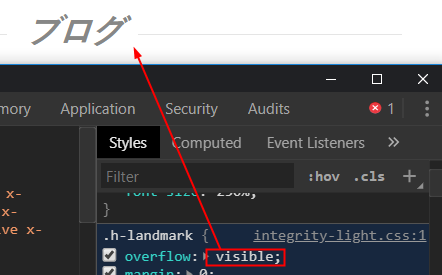
Hey @freedomdesign,

The headings were cut-off because the header landmark is set to hide overflowing content by design. For your case, you need to override that behavior. Add this code in Theme Options > CSS. I’m not sure what will be the effect overriding that though.

.h-landmark {
    overflow: visible;
}

Hope that helps.

@christian_y - this worked great - thank you!

You are most welcome. :slight_smile:

This topic was automatically closed 10 days after the last reply. New replies are no longer allowed.