How to change the official web site picture when I share my web site on social medias. If I send www.poulesenville.com it comes with a pictures. Where can I edit this picture in X theme ?
Hi There,
Thanks for writing in!
We are really sorry, but there no such option to add the image to the site for social media.
You can use Yoast SEO plugin and edit your Home page, in the social image section you add your image so that it would show in the social media when you share it.
This article will help you!
Thanks
It seems you did not understand the question… When I copy paste my web site link www.poulesenville.com to a conversation on facebook or any post
it brings with it, a picture that I wish to change. where and how in X theme do I change it?
Thanks,
Hello @larbour66,
Thanks for updating.
I am really sorry for the confusion and thanks for elaborating the question. There are couple of way to change the default fallback image.
-
First if you wish to change the default fallback image, same can be done from X > Theme Options > Social > Social Fallback Image. https://cloudup.com/cLnPMU1Tbu0
-
You can also change the image using Yoast SEO plugin. Please take a look at following tutorial:
Hope that helps.
Thanks.
Thank you, but None of the options you mentioned did make the change…
My fall social fall back image is ok… but different when I post my web site …uploaded the image on the welcome page, the yoast is using the right image and still the problem…
It must be something else…
Louise
Hello @larbour66,
In that case, can you please share website login details (username/password) in a secure note for us to take a closer look?
Thanks.
Hi there,
Our theme does not have any options other than the one my colleague mentioned regarding the fallback image for social media. The only other option available is the Open Graph which is for Facebook. I went to X > Theme Options > Social and enabled that option:
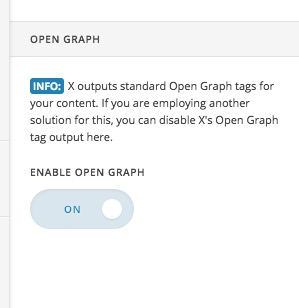
You need to clear all caches and contact your hosting service provider and ask them to clear any cache they might have internally. Then you need to wait till Facebook detects the code.
Other than that we do not have any more suggestions regarding this case.
Thank you for your understanding.
This topic was automatically closed 10 days after the last reply. New replies are no longer allowed.