Hello, I was hoping someone could show me how I can use the element css or class or ID to make it the same font as the rest of the site is using? Thanks
Hello @jgreenberg,
Thanks for asking. 
You can change the font by adding the class or adding inline CSS to change the font. Here is a screenshot.

To help you get started I have recorded a screencast video, please take a look. https://cloudup.com/cUYsszSLrTT
Thanks.
Hi There @jgreenberg
Thanks for writing in! You can manually add your custom CSS rule into your classic element’s style input box.
Example:
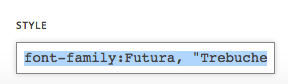
Or you can create a custom CSS rule, add it into your Theme Options > Global CSS area.
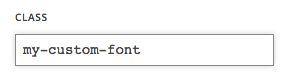
.my-custom-font {
font-family:Futura, "Trebuchet MS", Arial, sans-serif
}
Then you can assign the class name into your classic element’s class input area.
Hope that helps.
This topic was automatically closed 10 days after the last reply. New replies are no longer allowed.