How to change different Stack versions

Hello,

I wanted to use a blog page with the same layout that you have on stack ICON-2 (http://demo.theme.co/icon-2/blog/)
I changed the stack to ICON on Theme Options, but i’m not seeing how can i select the same layout as the one refered.
Can you help me with this?
My blog page is: http://cervejavadia.pt/novosite2018/blog/

Thanks in advance.
Best regards,

Nuno
Hi Nuno,

Upon checking your website you are using Integrity.

Please go to X | Theme Otions | Stacks and choose Icon.

After that on X | Theme Options | Blog you can adjust the settings.

Hope it helps

Thank you Joao!
I’ve kept the Integrity stack, but put more columns.
Now i have the problem that the post is behind the menu… how can i bring it down a little bit?
Best regards,

    Nuno

Hey Nuno,

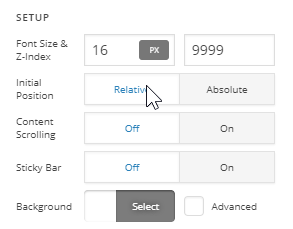
Your bar is positioned absolute. Please make it position relative.

Thanks.

This topic was automatically closed 10 days after the last reply. New replies are no longer allowed.