How to add video in the home background on Integrity?

Hi

I am trying to copy the home of this http://demo.theme.co/integrity-1/ where the video plays on the home and when you click on down button it scrolls to the actual home page with header etc. How do I create this?

I imported this demo and all plugins and extensions but that video isn’t there.
Hi Danish,

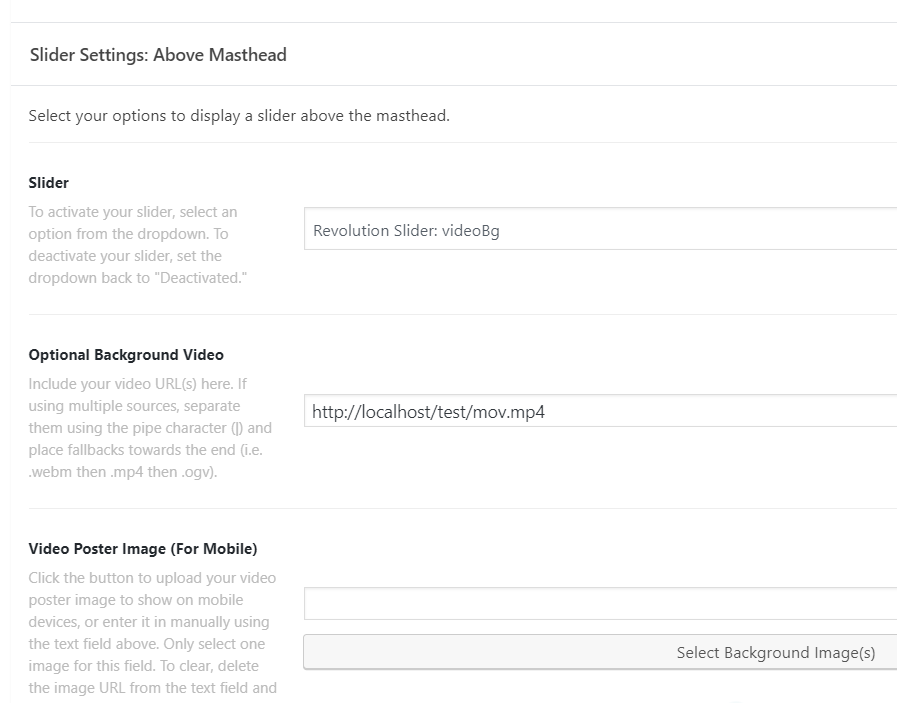
Thank you for reaching out to us. You can do this with Revolution Slider above masthead option. Edit your page in WordPress page editor, activate the Slider Settings: Above Masthead by selecting your Slider and then include your video URL in Optional Background Video.

For this you would need to create a transparent slide and slider. To learn more about Revolution Slider please see https://www.themepunch.com/revslider-doc/slider-revolution-documentation/

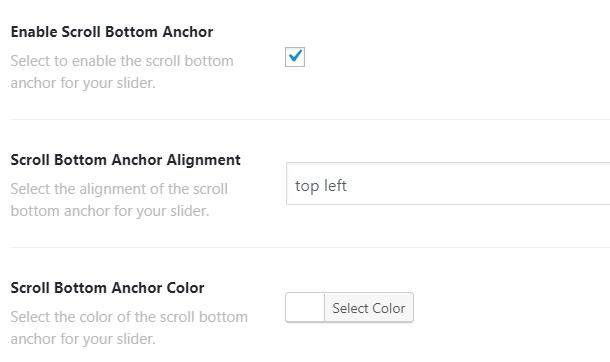
When you enable the Slider Above Masthead you’ll see the option to enable the Scroll to Bottom anchor simply enable it (see screenshot)

Hope this helps!

Thank you, I was able to get this done.

You are most welcome!

I have a related question though: is there a way I can disable the slider on mobile devices?

Hello Danish,

That is possible by adding this code in X > Theme Options > CSS:

@media (max-width: 767px) {
    .x-slider-container {
        display: none;
    }
}

Kindly note that since this is a custom code that changes the default behavior/display of the theme, you will be responsible to maintain or update the code in case you require further changes or if the code stops working in future updates. If you are uncertain how to proceed, it would be best to get in touch with a developer.

Hope this helps.

1 Like

Thank you that worked like a charm!

Glad we could help.

Cheers!

This topic was automatically closed 10 days after the last reply. New replies are no longer allowed.