I am making a row of 3 columns with images in each column - how can I add text over these images? Thanks
Hi There,
Thanks for writing in! Set a background image for each Column and set an inline style for each Column with a minimum height. For example: min-height:250px;
Then use Gap element and Text element to place your content.

Hope that helps.
Thanks. I worked out how to set the background image but how do I set an inline style for each Column with a minimum height?
Hi there,
Click on the Text Element that you added inside the column. Then from the left pane, you will see a breadcrumb-like section to access the column settings:
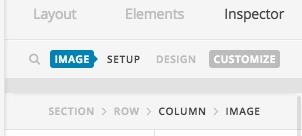
Click on the column to see the settings, then click on the Customize tab of the column settings:
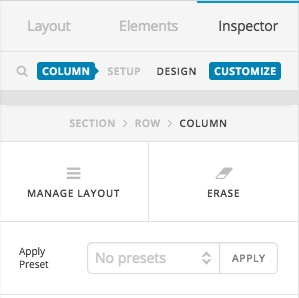
There you will find a section which you can add inline CSS code. Add the minimum height CSS code there like the screenshot below:
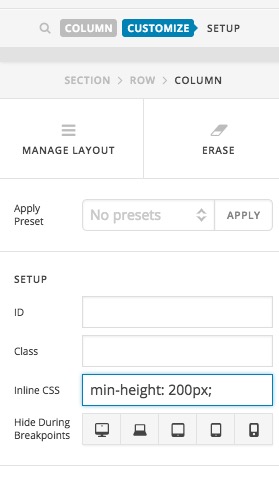
Change the 200px to whatever size you think is proper for your design.
Thank you.
Thanks! How can I add links to these background images?
Hi there,
Please kindly open u pa separate thread for additional questions, that will help us maintain the threads better and serve you as you deserve.
Unfortunately, there is no option to have a link to the background images. If you want to have a link you need to use the Image Element instead of the background.
Kindly read the thread below for more information:
Thank you.
This topic was automatically closed 10 days after the last reply. New replies are no longer allowed.