Hi, I don’t see any functionality to add posted date on posts/articles
I am using masonry style.
I can see title but not any categories/posted date
Hi, I don’t see any functionality to add posted date on posts/articles
I am using masonry style.
I can see title but not any categories/posted date
Hi Sachin,
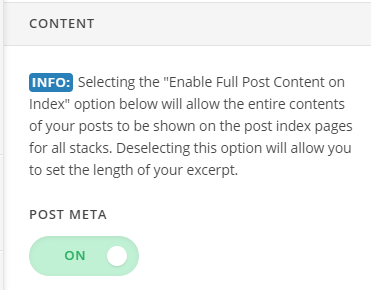
Thank you for reaching out to us. To show the posted date below the posts title, you only need to enable the posts meta. You can do this by heading over to Theme Options > Blog > Content and turn the Post Meta option On
Hope this helps!
Post Meta is ON but didn’t worked.
Hello Sachin,
Thanks for updating the thread.
Please try out following solution and let us know the outcome:
If you still have problems kindly get back to us with the result of the steps above and URL/User/Pass of your WordPress dashboard using the Secure Note functionality of the post to follow up the case.
Thank you.
Added secure note. Can you please check and let me know asap as it is holding
Hello Sachin,
The post meta info is not showing up because you have some CSS code in the style.css file of the child theme that is stopping it from displaying.
Please edit the style.css file of the child theme and find these lines of codes then remove them:
.single-post .p-meta {
	display: none !important;
}

.p-meta>span, .p-meta span:nth-child(3)::after {
    display: none;
}
Please note that the post meta will display, the post’s author, post date, categories, and comments info. If you only want the date displayed, add this code instead:
.p-meta>span,
.p-meta span:nth-child(2):after {
    display: none;
}

.p-meta span:nth-child(2) {
    display: block;
}
Hope this helps.
Hi Jade,
I am looking to get something like this : date - category .
For example : April 16,2019 - Nutrition/Pet Diet Tips
Thanks,
Sachin
Hi Sachin,
To do that, please add this code:
.p-meta span:nth-child(1) {
    display: none;
}
Then find and update this code:
.p-meta span:nth-child(3) {
    display: block;
}
to
.p-meta span:nth-child(3) {
    display: inline-block;
}
Hope this helps.
This topic was automatically closed 10 days after the last reply. New replies are no longer allowed.