Hello
I need to add unique IDs to sections. I searched for other support posts about it, but couldn’t find one that shows how to do it after the big changes in Cornerstone.
Could you help me?
Thanks
Tatiana
Hello
I need to add unique IDs to sections. I searched for other support posts about it, but couldn’t find one that shows how to do it after the big changes in Cornerstone.
Could you help me?
Thanks
Tatiana
Hello Tatiana,
Thanks for writing to us.
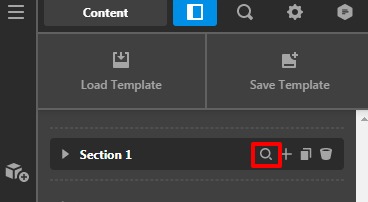
To add custom ID in the section you need to go to the Cornerstone builder—>Click on the Magnifier icon to inspect it—>Click on the Customize —>Add your Custom ID in the ID text field.
Please have a look at the given screenshot below.
Hope it helps
Thanks
Hi!!!
I knew it would be so simple 
Thanks a lot
Tatiana
You’re welcome Tatiana, glad we could help,
Cheers!
Hello Tatiana,
By withdrawing the post, I believe you already have resolved the issue. If the issue still existed, you can let us know.
Thanks
This topic was automatically closed 10 days after the last reply. New replies are no longer allowed.
