Once I’m able to add elements to pages, how can I add a password key like that on the Under Construction page?
Thanks,
Greg
Once I’m able to add elements to pages, how can I add a password key like that on the Under Construction page?
Thanks,
Greg
Hey Greg,
I’m not sure what you’re trying to achieve. If you mean lock a Cornerstone built page, that is not possible. There’s a Protect element in Cornerstone but you need to put all your content within that element to lock it.
Thanks.
I’m using Pro, not Cornerstone which is only for the X theme… The included “Under Construction” add-on allows you to password entrance to the site and it appears as a Key on the lower right side of the window. Someone clicking on the key and entering the correct password is allowed to bypass the Under Construction page and enter the site.
Again, this is in regards to the Pro theme not X… Should have a support forum for X and another one for Pro.
Hi there,
The functionality of the Cornerstone and Pro Builder are the same regarding the content at the moment.
There is no way to use elements under the password mode.
The only option you have at hand is to use the default functionality of Wordpress to password protect the whole page:
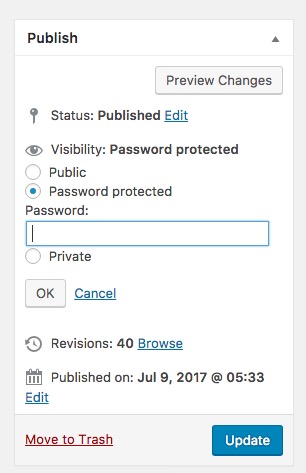
But you can not do it for a specific element.
Thank you for your understanding.