How remove bar using Header in X Pro?

Hi there,

I’m using hero header template in X Pro and I have the top bar all set. When I try to remove the second bar, which includes the background image and text “These Three Remain… etc” everything disappears and I have a white screen.

I’ve attached an image to help illustrate my issue.

Thanks!
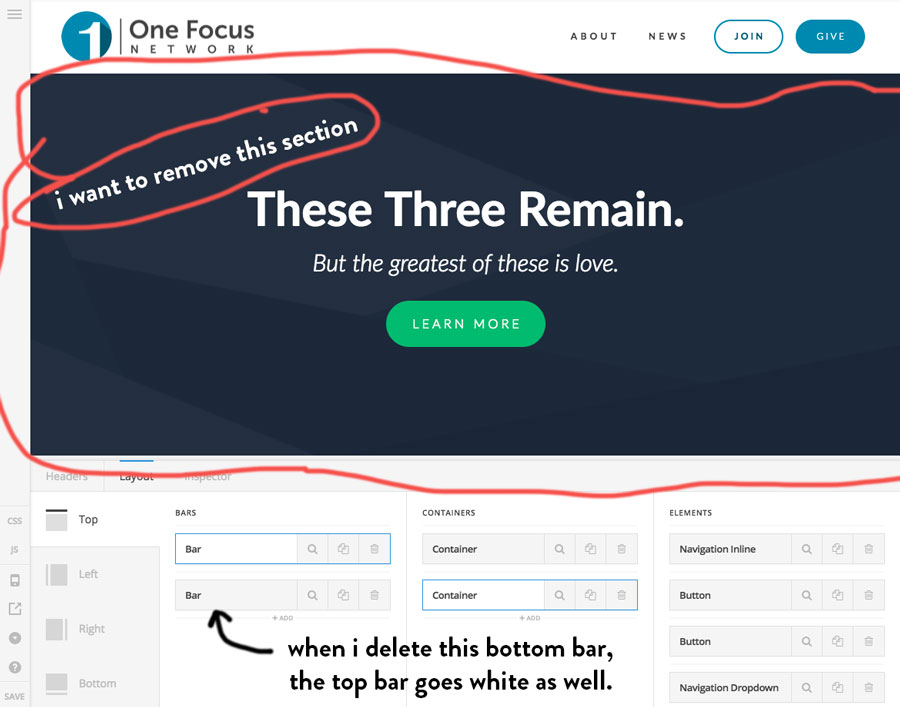
Hi,

When you hover over the bar or container it should highlight the element in the preview section.

https://www.screencast.com/t/hXNjQJM84Ld

You need to check which bar/container it is, I can see in the source code it is a container.

Thanks

Hey Paul,

It’s difficult for me to tell if it’s a bar, or a container, because when I hover it appears multiple things are being selected. It appears the top bar is the nav and the bottom bar is the nav and the hero below so any changes I make the hero washes out the navigation. Perhaps it would be best if y’all just take a peek?

Hi There,

As you can see, on the very left, you selected the bar, on the middle, it is the second container of the bar.

Please delete the second container.

Hope it helps

Yeah, I’ve tried that and everything goes blank, not just the bottom part.

Hello There,

Thanks for updating in! After you remove the second bar, please make sure that the first bar’s initial position is set to “Relative”.

We would loved to know if this has work for you. Thank you.

Yep, that did it. Thanks so much!

On behalf of my colleague, you’re welcome! :slight_smile: Cheers!