hi there,
i*d like to use more than 6 columns (12 would be great) in a row. but whatever i type into the custom setting 6 seems to be the limit. or is it possible?
flexbox would be an alternative. but i understand that cornerstone uses it only in the header und footer area. right?
thanks for your help! best wishes, kai
Hello Kai,
Thanks for writing in!
You can use custom in the row set up and insert 1/6 + 1/6 + 1/6 + 1/6 + 1/6 + 1/6. This will give you six columns in a row.
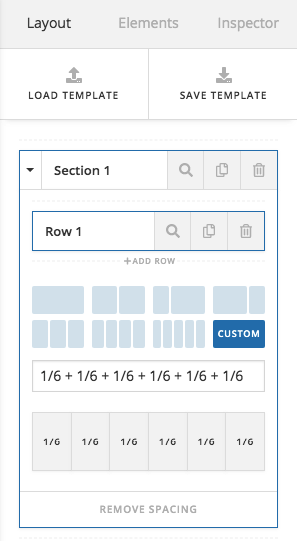
Or you can create a two column row and then insert another row element with 3-column set up for each column.
Hope this helps.
dear @RueNel,
thanks for your reply.
but i was asking if i can have more than 6 columns. 12 preferably.
can i then make a 2column row and insert 2 times 6 columns?
and how would i insert another row element into a row element?
thanks again! kai
Hello Kai,
If you need more than 6 columns, you will need to nest the rows and columns. With the latest version of Pro Editor or Cornerstone, you can easily do that by insert the new row element into your columns.
You will have to insert this row element inside the column. You will have this element structure:
- Row
  - 1/2 Column
    - row
      - 1/4 column
      - 1/4 column
      - 1/4 column
      - 1/4 column
  - 1/2 Column
    - row
      - 1/4 column
      - 1/4 column
      - 1/4 column
      - 1/4 column
This structure will give you 8 columns.
Hope this make sense.
dear @RueNel,
thanks again for your help!
the solution for me was much easier than you might have thought - i did not know about the new row element (maybe i saw “row” and did not expect columns, too) 
thanks again and have a nice weekend! kai
Glad we could help and you’re most welcome!
This topic was automatically closed 10 days after the last reply. New replies are no longer allowed.