Hello, I can’t seem to find this information anywhere but I am looking to remove the horizontal bar that is above my menu in the header (see photo)
How do i - remove bar completely?
- move bar closer to menu text?
Thanks!
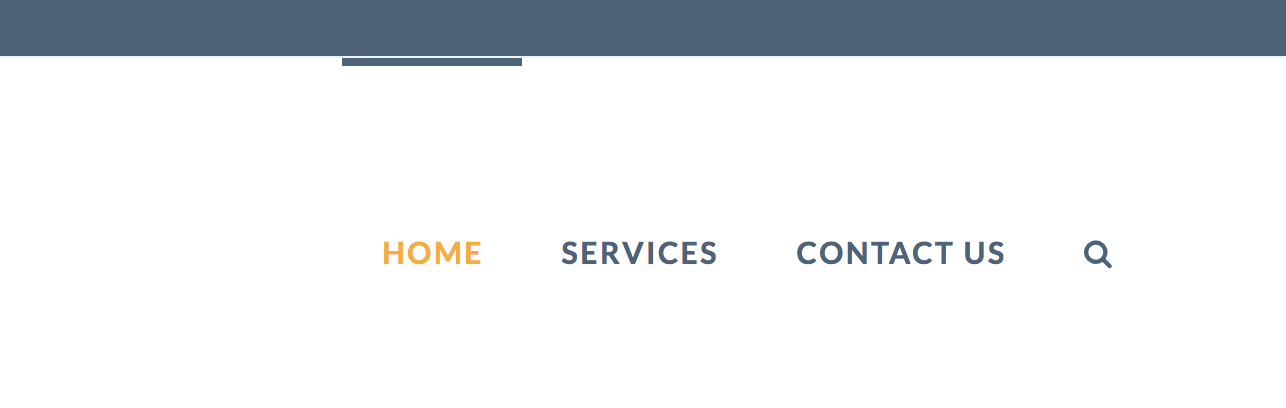
Hello, I can’t seem to find this information anywhere but I am looking to remove the horizontal bar that is above my menu in the header (see photo)
How do i - remove bar completely?
Thanks!
Hello @callyarndt,
Thanks for asking. 
If you want to remove the bar, then please add following CSS under X > Theme Options > CSS:
.x-navbar .desktop .x-nav > li > a:hover, .x-navbar .desktop .x-nav > .x-active > a, .x-navbar .desktop .x-nav > .current-menu-item > a {
    box-shadow: none;
}
In case you want to adjust the spacing but display the bar then add following CSS:
.x-navbar .desktop .x-nav > li > a:not(.x-btn-navbar-woocommerce) {
    padding-top: 50px;
    height: 80px;
}
If you would like to learn CSS, I am sharing few resources that you take a look to get started with CSS and an interesting tool that you can use to speed up the development process.
I recommend you to watch following video that will help you to get started with CSS.
Sometimes it can get a bit difficult to find out the right selector to be able to write the required CSS codes. A handy tool that can help you in this is Google Chrome dev tools. I am sharing the resource that you can refer to get started with dev tools.
https://developers.google.com/web/tools/chrome-devtools/css/
Thanks.
Thank you so much!!! That worked. Appreciate the help.
You’re welcome!
Thanks for letting us know that it has worked for you.
This topic was automatically closed 10 days after the last reply. New replies are no longer allowed.