How do I make buttons navigate to categories?

Hi,

I want to have various ways to navigate to categories including button navigation but I can’t see how to do that. I see a place to enter a URL in button creation, but how do I find the URL for each category (if that’s what I need to do)? How do I make a button navigate to a category? Thank you.
Hi there,

To find out the exact URL of a category to be able to add in the Link option of a button element you will have to go to Posts > Categories and you will see the list of categories there.

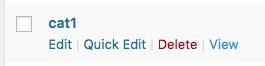
Hover over your mouse on the category which you are interested in and click on the view link which appears just below it:

On the newly opened page copy the URL of the page from your browser address bar and paste it to the Link option of the button element. For example, in my case, the URL of my local installation for the cat1 which is the name of my category is:

Thank you.

Thank you very much for your reply. It’s working fine now. I appreciate your clear instructions.

You’re more than welcome, glad we could help.

Cheers!

This topic was automatically closed 10 days after the last reply. New replies are no longer allowed.