I have been enable to center the image but it does not fill a full width row with the container disabled. How can I make the image span the entire screen responsively?

Hello @juryk,
Thanks for writing in!
I have checked the page and I can see why the image is not fullwidth. You will need to set the width of the image element to 100% and then disable the “Retina” so that the full image will be displayed.
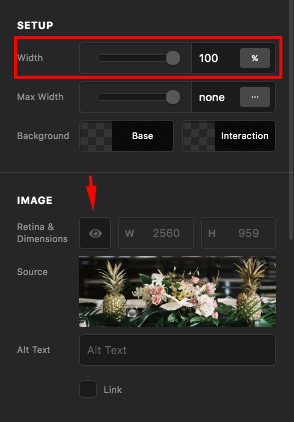
We would love to know if this has worked for you. Thank you.
worked perfectly thank you!
What does the Retina option do exactly?
Hi @juryk,
The retina option cuts the image dimension to half to make sure it looks sharp (not blurry) on retina enable device. That means, if you have a 1000px natural width image, it will only render as 500px. So if you want to support the retina display, you need to double the size of your images.
Thanks,
This topic was automatically closed 10 days after the last reply. New replies are no longer allowed.