How can I really center my logo in my site. www.sebastienmarchi.com to center logo dead on now it is a bitr off to the left and it is bothering me.
Thanks
How can I really center my logo in my site. www.sebastienmarchi.com to center logo dead on now it is a bitr off to the left and it is bothering me.
Thanks
Hi Sebastien,
Thanks for writing in! Basically you can add the following CSS rule into your X -> Theme Options -> CSS area to hide your default logo.
.x-brand.img {
    display: none;
}
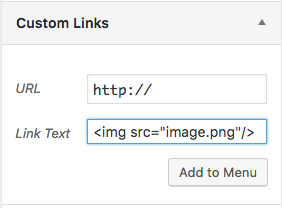
Then you can add the logo into your menu item, so that it will be on the center of the navigation. For that, head over to Appearance -> Menus section and add a custom menu item with the image path to your logo.
If you require further customizations on this, I suggest you to contact a developer or a service.
Thanks!
Thanks for nothing… im trying to learn and you give me a stupid answer like this.
Hi Sebastien,
I’m really sorry for the confusion what Darshana really meant is we place the logo as part of the menu, maybe between the “resources” and “quote” menu item.
To do that, you need to add a new Custom Link to your menu with the <img> code as the Label.

<img src="http://www.sebastienmarchi.com/wp-content/uploads/2018/07/logo.png"/>
Then position this Custom Link on your menu where you want it to be placed, between “resources” and “quote” would be ideal. We might need a custom CSS later to resize this logo and provide some spacing, for now, this will do the trick of adding the logo on the center of your menu.
Now with this, you will have 2 logos on the header, so we need to hide the original one that was on the left, that is where the custom CSS provided comes in. You can add this to Theme Options > CSS
.x-logobar,
.x-brand.img {
display: none;
}
Then to center the menu, navigate to X > Theme Options > Header and set the Layout to Stacked.
Hope it helps,
Cheers!
This topic was automatically closed 10 days after the last reply. New replies are no longer allowed.