How Can I Place text in ( join the newsletter) in the email form - On top of the background graphic so i dont need to creat a text element above the form in its own section? this way its like part of the form.
Thanks
How Can I Place text in ( join the newsletter) in the email form - On top of the background graphic so i dont need to creat a text element above the form in its own section? this way its like part of the form.
Thanks
Hi @rotation,
Thanks for reaching out.
You mean you wish to add Join the newsletter as form title? You can utilize this option from your Email Forms
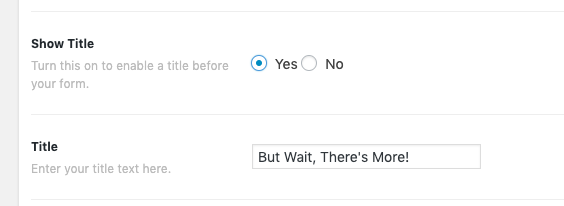
But if you’re referring to adding text above it, you can simply add a text element above it. Or if this is still related to other related thread where you wish to move the from in the footer, then add the text before the shortcode 
<h2>Join the newsletter</h2>[your_shortcode_here]
Thanks!
Ok I fount how to add that text. how can I center the text its set to the right? How can I make the text smaller. its too big?
How can I choose the font?
Thanks
Hello @rotation,
It is best that you provide us the url of the page where we can see your text and the form. This is to ensure that we can provide you with a tailored answer to your situation. Once you have provided us with your URL, we will be happy to assist you with everything.
Thank you.
ok will do
Hey @rotation,
Thank you for the URL. To make your text center and change the font properties, add the following code in the Theme Options > CSS:
.tco-subscribe-form h1 {
    text-align: center;
    color: red;
    font-family: "Lato",sans-serif;
    font-size: 25px;
}
Feel free to make adjustments in the code as you need. Don’t forget to clear all caches including your browser’s cache after adding the code. Let us know how this goes!
This topic was automatically closed 10 days after the last reply. New replies are no longer allowed.