This is the link: https://www.happyfitplatform.com/shop/
As you can see, the headline and text looks completely different from all the other pages on the website. The problem is that I cannot find for the life of me where I can take out that “THE SHOP - Welcome to our online store. Take some time to browse through our items.” Where can I find the HTML of this so I can take it out? or is it an incompatibility issue Woocommerce to X theme? I have the same issue with the links in the footer, when I click any of them I get the message that I blew up the internet and it looks like it is in the same style as per the shop page. The links worked before installing woocommerce.
Thank you!
Hi Diana,
Your question consists of two separate cases which are not related to each other. So I will answer them separately:
Shop Title:
Please go to X > Theme Options > Integrity and scroll down to end to see the proper options to change the title you mentioned:
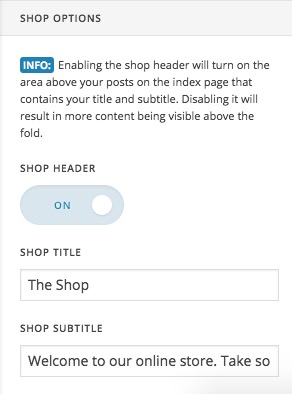
Footer Link:
The final link is this: https://www.happyfitplatform.com/shop/www.happyfitplatform.com which is wrong as you can see it repeats the main domain name.
I think you forgot to add http:// to the link. So you need to go to X > Theme options > Footer and change the added code there to:
<p>COPYRIGHT © 2018 <a href="http://www.happyfitplatform.com" title="X – Happy Fit Online Platform" style="outline: none;">HAPPY FIT PLATFORM</a></p>
Thank you.
This is great, Thank you so, so much! <3
You’re welcome. Glad we could help.
This topic was automatically closed 10 days after the last reply. New replies are no longer allowed.