I’ve read a few other posts that were similar, but didnt really feel like the question was answered. It seems like the only ways my blog page can be viewed is way too big filling the whole screen, or masonry style. Is there any way to keep the posts in one column without having them take up the entire screen?
Hi @laura,
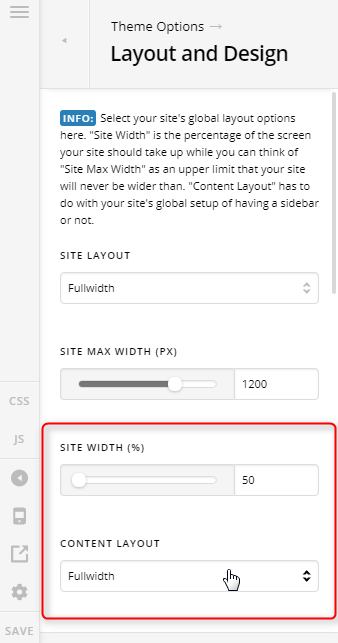
Thank you for writing in, to do that, please navigate to Theme Options > Layout and Design and set the Site Max-Width and Content Layout to Fullwidth
The Site Max-Width setting is the one that will prevent your content from filling the content area.
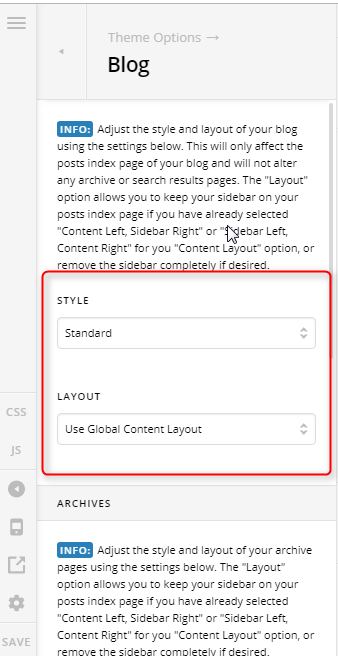
Then under Theme Options > Blog set the Style to Standard, and the Layout to Use Global Content Layout
Hope it helps,
Cheers!
hey thanks for the response, but it seems when I change the site width it actually changes the width of other pages as well.
Hello Laura,
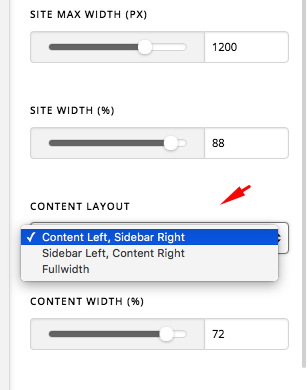
The Site Width will be applied globally and not just to your blog page. Do you want to display a sidebar in your blog index page instead? If that is the case, then you will have to change the Global Content Layout to Sidebar Left, Content Right or Content Left, Sidebar Right.
Here’s what I want you to do. Please identify which pages would have a Sidebar and which pages should be displayed in Fullwidth and then we can provide you a solution after that.
Best Regards.
hey thanks, yes so in my case I just want the blog post to display one image at a time not tiled, but smaller sized so it doesnt fill the page. just looking for something more congruent to the home page
homepage:
https://growthwise.us/
Blog Page:
https://growthwise.us/blog/
i went ahead and switched it back to single image view so you can see how it only displays very large.
in the image you have as a screenshot it actually shows an option that i don’t have for “content width”. my editor is only displaying “site width” & “site max width”. is there something I need to do to reveal that option?
hope all of that makes sense, in short I am looking to display the homepage as it is and make the posts on the blog page smaller.
Hey Laura,
Do you want to display like this?

If that is the case, please add the following CSS code in the X > Theme Options > Global CSS (http://prntscr.com/evui3r)
.blog .entry-featured,
.archive .entry-featured {
    padding: 0 10%;
    border: none;
}
We would love to know if this has worked for you. Thank you.
oh wow thanks! it is much better, is there anyway to have it affect the text and the image? at the moment its just changing the size of the image. thank you so much 
Hey Laura,
You must also target the Entry Header to achieve that. Update the code to this:
.blog .entry-featured,
.archive .entry-featured,
.blog .entry-header,
.archive .entry-header {
    padding: 0 10%;
    border: none;
}
Please check the before and after screenshots below if this is what you wanted.
Before:

After:

Hope that helps.
This topic was automatically closed 10 days after the last reply. New replies are no longer allowed.