in this toppart on my website (www.wonderacademie.nl), a small tagline appears when i hover over it. It says: free from fear. I would like to edit this, but i have no idea anymore where to find the place where i can edit it. Is it somewhere under customizer?
i couldnt get this on the prntscr, it dissapears when i move the cursor.

Hello @wonderacademie,
Thanks for asking. 
That appears to be a banner image. You can edit the hover title from Media > Library. After that open the image and edit the title. https://cloudup.com/cQjJiFjpQ_m
Thanks.
no, that is not it.
in the medialibrary the title that goes with this image is: bannerlogowa
so, not “free from fear”…
I remember it was somewhere with “logo” or “tagline”. I just dont know how that is called in X.
thank you
Hi There,
Thanks for the clarification and sorry for the confusion.
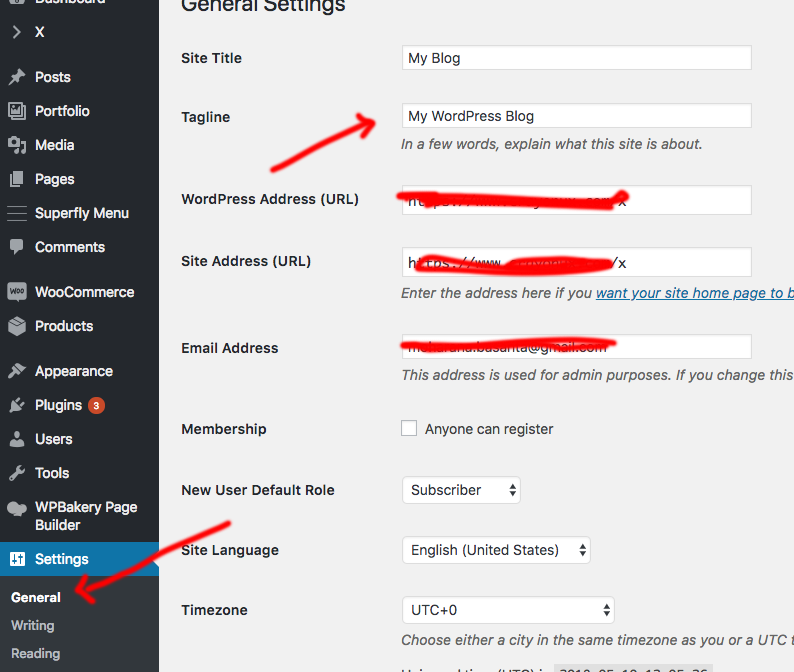
Please go to Dashboard -> Settings -> General please change the site tagline text so that it will replace the text on hover.
Thanks
super! that’s it. Thank you for being of service on this holiday.
You are welcome
This topic was automatically closed 10 days after the last reply. New replies are no longer allowed.