Hover color of active link

Hi I am issue with the active link color.
I have used this css
.x-navbar li:hover{
background:#1086ec !important;
}

.x-navbar ul.sub-menu{
background:#1086ec !important;
}
from another post but now issue is my active link showing in white. also I wana change the mouse hover link color also.
just link this website.


I am using same theme “education” please guide
Hi @bajwha,

Thanks for writing in.

Update this code of yours so that the menu hover will be change

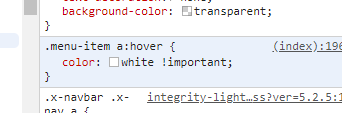
I believe that it is located in your custom CSS:

.menu-item a:hover{
  color:white !important;
}

You could remove the code above to remove the white active color and change it using the class below:

.x-navbar .desktop .x-nav > li > a:hover, 
.x-navbar .desktop .x-nav > .x-active > a, 
.x-navbar .desktop .x-nav > .current-menu-item > a {
  color:red;
}

Hope it helps.

Let us know how it goes.

Thanks.

Hi Nico thanks for the reply

this work with me below custom css

.x-navbar a:hover {
color: #ffffff !important;
}

.x-navbar li:hover{
background:#1086ec !important;
}

.x-navbar ul.sub-menu{
background:#1086ec !important;
}

thanks

You’re welcome. Glad we could help.

This topic was automatically closed 10 days after the last reply. New replies are no longer allowed.