Hello Tom,
Thanks for writing in!
Rows are stacked below each other by default. It is the columns that displays next to each other horizontally. When you add a Row element, you will also need to add columns because the columns will be next to each other horizontally depending on their widths.
If you are using Row element and want the columns to be stacked below each other, simply set the width to 100% of just one column the layout options in the row settings so that all of your columns will be stacked.
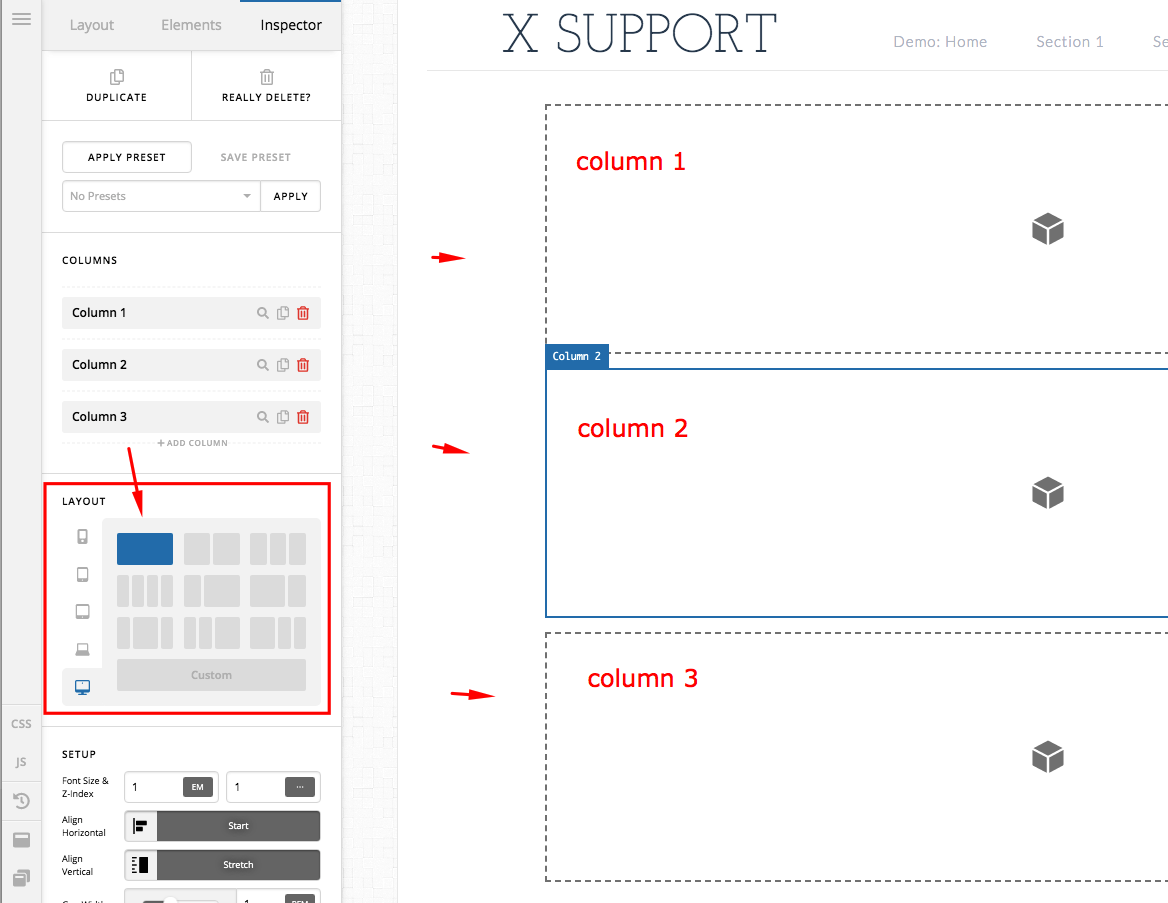
For more details, please check out our tutorial videos:
Meanwhile, the “Grid” in the Content Layout Element option should not be displayed in X. It is a bug in the previous release. You may need to update to X 7.1.2 and Cornerstone 4.1.2.
The Grid element is exclusive to Pro users. You can start working with the Grid Element in a number of ways.
- You can drag a new Grid into your page from the element library
- Under Preferences, you can set “Grid” as the Content Layout Element. This will make it the default child of new Sections
- While on the Layout tab, hold cmd/ctrl and click the + icon on a Section. This will let you choose what type of element should be created.
- Check out our Grid Element Series on YouTube. This 7-part tutorial will walk you through everything from simple to advanced uses of this exciting new Element!
For now, the Grid element is only available in Pro theme.
Best Regards.

