Hi, having issues with home page, two think, white horizontal lines bordering video. Have reported before, was advised to turn on Legacy. Did this, but lost video… any idea how to solve this issue?
Much appreciated
Hi, having issues with home page, two think, white horizontal lines bordering video. Have reported before, was advised to turn on Legacy. Did this, but lost video… any idea how to solve this issue?
Much appreciated
Hello David,
Thanks for asking. 
There are empty Paragraph tags on the website and because of that you are getting white horizontal borders. Please remove the same and that should resolve the spacing issue.

Let us know how it goes.
Thanks.
Hey Prasant,
Thank you for your help, much appreciated.
Can you assist me in how i get to the page you have screenshot? Assume this is code, really have no idea how to find. Would I delete the
</p == $0?
Thank you in advance.
Very Best
Hi,
Please check you page content and each element nad make sure there are no extra spaces and next line.
For the mean time you can try adding the code below in Theme Options > CSS
body p:empty { margin-bottom:0; }
.wpb_content_element {margin-bottom:0;}
Hope that helps
Hi Paul, thanks for advice, appreciated.
I’m a total newbie to this… Can you advise how i get to theme options, have looked through dashboard to find to no avail. Should I be doing this via w bakery or in editing pages?
Very Best
Hi David,
Please see the screenshot below:
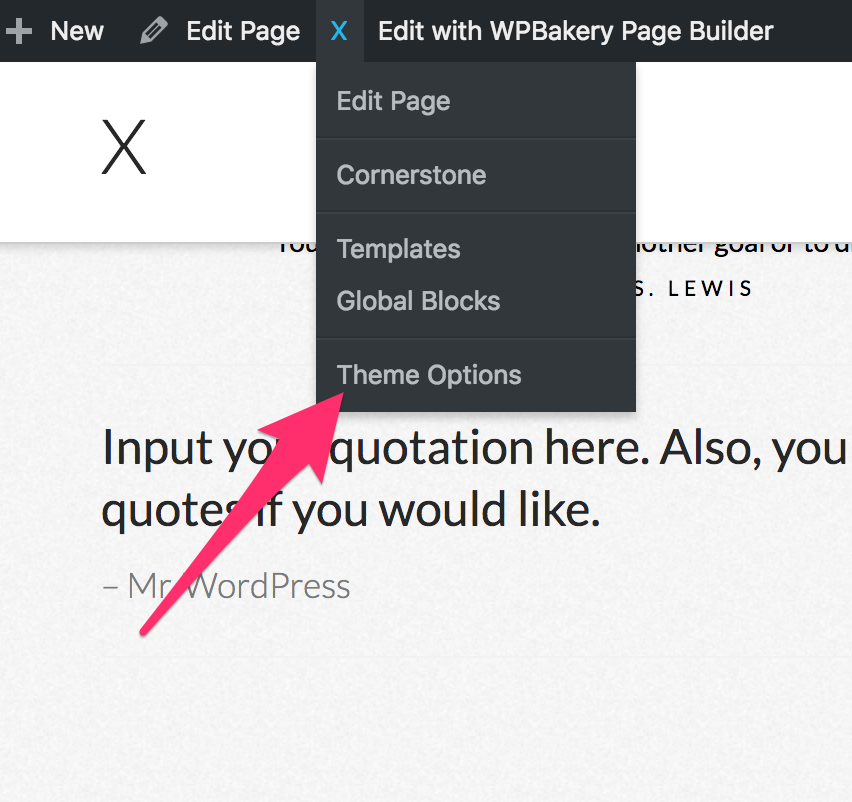
Hope this helps.
Thank you! Greatly appreciated.
Very Best
Glad we could help.
Cheers!
This topic was automatically closed 10 days after the last reply. New replies are no longer allowed.