I would like to change the horizontal alignment of the navbar, so that the logo and the menu use more of the space. Right now the menu breaks and looks bad.
Hi there,
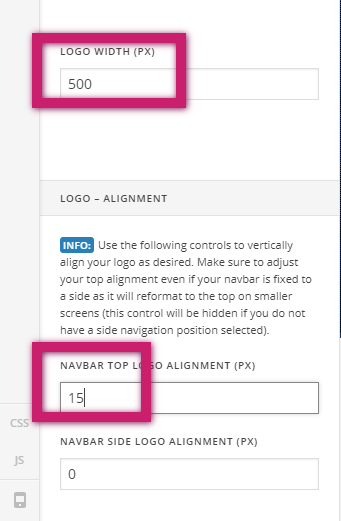
The logo size seems to be too wide. Have you tried setting the logo size in the theme options to 500px?
Also set the Navbar Top Logo Alignment (px) to 15 px.
Thanks this worked!
However, the logo looks a little bit washed out now?
Also, what does “NAVBAR SIDE LINK ALIGNMENT (PX)” do?
Please resize the actual logo file to the size you are using right now so that the image will not look compressed.
It is the spacing on the side of the logo.
If I make the logo file smaller, it will look bad on high resolution screens right?
Hi there,
No it wont. The logo will remain as is. For example, if the logo image file’s width is 500px and that is the setting you have set on the theme options, the maximum width of the logo will be 500px and should not go more than that even in wider screens.
Hope this helps.
1 Like
Thanks this worked!
How do I get rid of the little plus icon in the top right corner (see screenshot)?
Hi There,
Go to X > Theme Options > Header > And disable the header widget areas.
Hope it helps!
1 Like
This topic was automatically closed 10 days after the last reply. New replies are no longer allowed.