Home Page Feature Area

Hi! I am changing photos on my homepage feature area. The pics look great when I am viewing them in the inspector, however, when I save and I look at the live site the pics do not look the same ( they are not occupying the entire image space. ) Any ideas? Tks!!

https://www.screencast.com/t/lxITuPCROf ----- This is what it looks like in the inspector

https://www.screencast.com/t/8Q6fHifvg------------ This is what shows up on the live site
https://www.screencast.com/t/8Q6fHifvg ---------- This is the live site

Hi There,

Thanks for writing in!

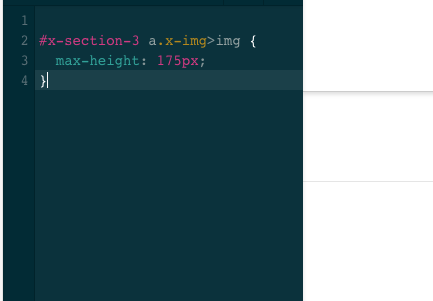
The issue is due to the custom CSS that you have added for the image.

#x-section-3 a.x-img>img {
  max-height: 175px;
}

It taking the proportionate width of the image as the images are not consistent in height or width.
Please remove the CSS, it will work fine or you can use equal height and width image so that there no need of this CSS.

Thanks

I don’t see this in the CSS, where can I find it? This is what I see…

Hi There,

You are checking in Global CSS. The Custom CSS is in the page CSS.
Edit the page in cornerstone and click on the CSS icon in the left. You will find the CSS there.

Hope this helps!

1 Like

I want all of the images to be the same width and height but when I edit the images through the editor I cannot get them all to match. Is there code I can add so that they adjust to fit within the specific frame so they all look the same ?

Hello @borinqen,

I have checked your site and I found out that the dimensions of the images that you have uploaded is not the same. There is an image with a dimension of 1280x960 and there is also 1280x853 or 730x342. With the different dimensions, you cannot expect the same width and height results when displayed in a column. What you can do is to edit your images and make sure to update the same dimensions to achieve what you have wanted to display.

Please understand that the given css code, or any given css, is just a band aid fix. Setting the width or height of the image will not give you a flawless grid or images in columns as a result. The best thing to do here is to re upload those images with the same dimensions.

Hope this make sense.

1 Like

This topic was automatically closed 10 days after the last reply. New replies are no longer allowed.