Hide featured image from the content of portfolio item

Hi,

I would like to have portfolio items (and/or posts) with the “featured image” in the overview (as is normal). BUT: when I open that portfolio item, I would like to hide the featured image (and the Title if possible) from the top of the portfolio item content (in fact I would like to display an empty page that I can configure myself on an individual base (e.g. showing a black background and a slider on top of it)).

Even better: would if be possible to show a minature slider as the “fetured Image” of a portfolio item?

(I’m using X-Theme with Icon Stack and a Child Theme for my modifications)

Thanks

Elmar
Hi There,

Thanks for writing in!
Can you please send us a mockup of what exactly you want to achieve on the page.
Please send us your website URL too so that we can suggest you better.

Thanks

One example is https://ami-beach-home.com. There near the end of the page you can see 2 Portfolio items. Have a look at the one with the sunsets.

Instead of the static image shown there, would it be possible to show a miniature slide show or a slider?

When I open that item, I would like so se a blank page with a black or grey background (so no title and not the featured image). That page I would like to design with cornerstone. Right now, when I want to show for example a slider, it first shows the title, the featured image (both on a white background wich is not ideal for pictures) and only after that I can insert the content I really want to show.

Hey @ElmarFrank,

Regretfully, it’s not possible to put a slider in the Recent Post element.

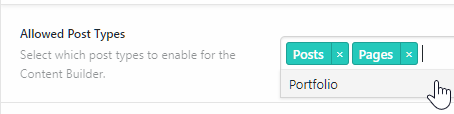
Regarding the portfolio item, first enable Cornerstone for X Portolio. To do that, go to X > Settings and add in the Portfolio post type in Allowed Post Types

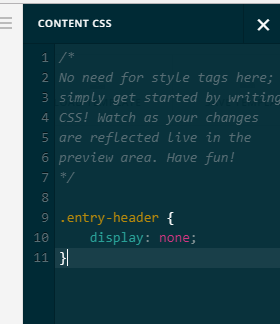
Now you can edit your portfolio content with Cornerstone and with Cornerstone, you’ll be able add CSS for your specific page thanks to the Content CSS feature.

To hide the featured image and title, please add this code to your Content CSS.

.entry-featured,
.entry-header {
    display: none;
}

Regarding the black background, are you looking for something like this:

If so, please add this code also.

.entry-wrap {
    background: black
}

Hope that helps.

This topic was automatically closed 10 days after the last reply. New replies are no longer allowed.