Hi there. I am using this css: .h-custom-headline hr.accent-1 { background-color: #84c5c9
; } to create an accent under my headlines. But on mobile, it adds too much space. Is there a way to hide it?
Hello @Lorie,
Thanks for asking. 
Can you please share exact page URL as I don’t see above code getting applied on the home page of tlc.strategiccommunication.biz? In case if I am missing something, please let me know.
Thanks.

Hi. It’s the blue accent under the headline.
Thank you.
Hello there,
Please update your CSS code to:
.h-custom-headline hr {
        width: 50%;
        height: 3px;
        max-width: 350px;
        margin: 20px 0;
        font-size: 0.375em;
        background-color: #84c5c9;
 }
@media only screen and (max-width: 767px) {
   .h-custom-headline hr {
        margin: 0;
    }
}
And remove the following:
-
<p></p>as it adds additional space.
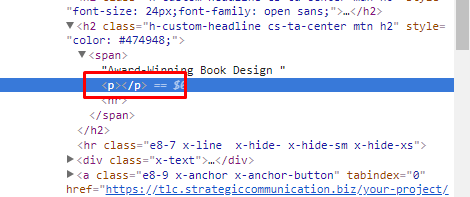
- CSS as it is unnecessary
@media only screen and (min-width: 767px) {
    .h-custom-headline p, .h-custom-headline br {
        display: none;
    }
}
Hope this helps.
This topic was automatically closed 10 days after the last reply. New replies are no longer allowed.