Hi needs help to remove extra thickness in top menu bar

So i bought a mini car plugin ( from woocommerce although im not happy with it - i was expecting it to show product images as well )) like the other great mini plugins i see ( i think ajax ones ) - anyway - i got it going - and removed the topbar from x theme options - but now i see the top menu bar is ( and was ) also with lots of padding on top and bottom so i tried my best to fix myself and make it as thin as possible - but i can not find how.
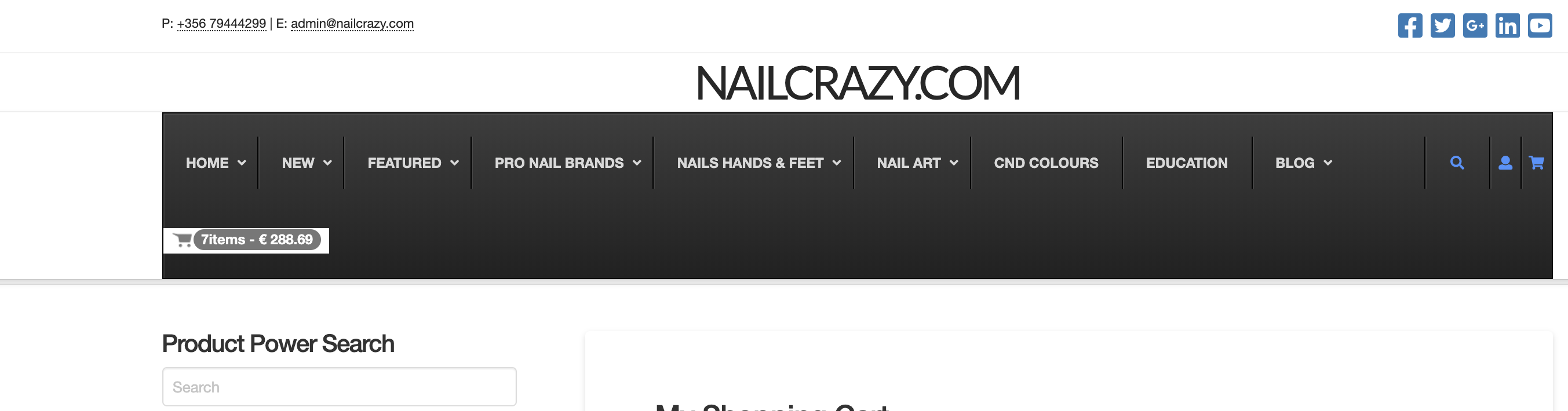
Can you please help me make my top menu bar look pretty :}
or show me where i can tweak the padding.

Thanks again
Andrew

Hello Andrew,

Thanks for posting in! The UberMenu plugin does not support Mini Cart plugin. I would recommend that you contact the creators of Mini Cart plugin and ask them you can you make it fit into the UberMenu. They should be able to guide you how you can fix the cart plugin into the navigation as one of the menu items of Ubermenu.

Best Regards.

thanks - i did actually try it myself becuase I already have set up on Ubermenu a custom text box which i use to put the short code for a mini icon - that connects to cart page. . .but when i replaced the shortcode with the one for the mini cart . .it crashed my site - and i had to revert. - I will contact mini cart guys and see if they can help because i can get the mini cart to work on the right - and on the same line as the rest of the items - it should reduce the height of the menubar i suppose because everything will be on 1 line. - Thanks for your suggestion i will keep this post updated in case anyone else needs something similar.
:}

You’re welcome, Andrew.

This topic was automatically closed 10 days after the last reply. New replies are no longer allowed.