Hero image size

Hello, I’m trying to create a hero image with text overlay and a CTA button. The two issues I’m having are:

  • Extra space between the book now button and the headline.

  • The image is cut off and I’m trying to figure out how to increase the size of the image so it extends to the crown without increasing the font size of the headline text.


    I’m new to this so I’m sure it’s something simple I overlooked.
Thank you.
Hi @RoseA19,

Thank you for the details.

1.) The extra space between the text headline and the button could be coming from a margin in one of the elements. If you are using separate rows then probably a padding or margin of the rows.

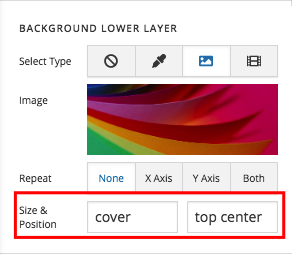
2.) The image will always gets cut off because by default, the background image is set to cover the whole section and position at the middle of the area. Please change the position to top center instead.

We would love to know if this has worked for you. Thank you.

What’s the best way to create responsive text for the headline and subheadline? I see the responsive text option under settings but there isn’t a customize option for the headline and subheadline text, just a customize option for the section, row, and column. Thanks for your help!

Hello @RoseA19,

You must apply responsive text for the headline (and subheadline) and manage it in Settings > Responsive Text. To know more about responsive text, please check it from our knowledge base here:

Hope this helps.

This topic was automatically closed 10 days after the last reply. New replies are no longer allowed.