Help with PRO / Cornerstone / Content Builder

Hi, First off, do you guys have a tutorial that is up to date?

I’ve been using cornerstone for quite a while, but this new iteration of pro is a bit hard for me.
For example. Where has the custom inline css gone from elements (in case of the new ones)?

For example, I add a NEW image elements, there’s no option for inline styling. I know I can add classes and then use the css button on the left, but it just feel a bit more convoluted than before. I rather just use the old element.

Again with the image, why does the new element show up as a small rectangle instead of the old design? I found the earlier design more useful for laying out content in the beginning.

Let me know if I’m doing something wrong.

Thanks!
Hi There,

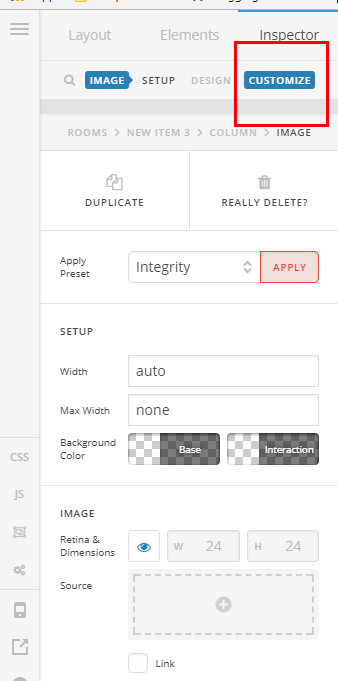
Regarding the Inline CSS on the V2 elements, every element has now a customize tab which you can find the Inline CSS BOX

I personally agree with you the square grey image is not ideal, I will forward your feedback to our developers so they can take in consideration.

Hope it helps

Thanks for that!

However, like you said, there’s a new customize tab for these new elements. That’s good and all, but there’s no dedicated block for inline css there. Here’s a quick screenshot:

Hi there,

Yes, looks like it’s recently removed, in that case, you should use CSS. In your customize section, add custom_css_1 to Class input, then in your global custom CSS with your own CSS.

.custom_css_1 {
/* your styling below here */

}

Thanks!

Can I perhaps give some feedback regarding this update somewhere? It would be great to have it back in some cases.

Also just a quick question. Where are these css files stored that which we enter through theme options and content builder?

Thanks!

Also another suggestion to bring back:

I’m using pro 1.2.4, and when I’m in the layout builder it used to be so that when I hovered over a certain SECTION or ROW, it would have been highlighted in the visual editor. Now this doesn’t happen. I have no idea which part I’m editing without going into detail.

Hi there,

The inline CSS for the V2 image element was removed because more of the CSS that you can add to an image can be done with the options that is available for the element such as border, border radius, margin, padding, and box shadow.

Please note that you can still use the Classic Image element which has the features that you are looking for including the inline CSS.

The section and element highlight is still present on Pro builder for the newest version.

This topic was automatically closed 10 days after the last reply. New replies are no longer allowed.