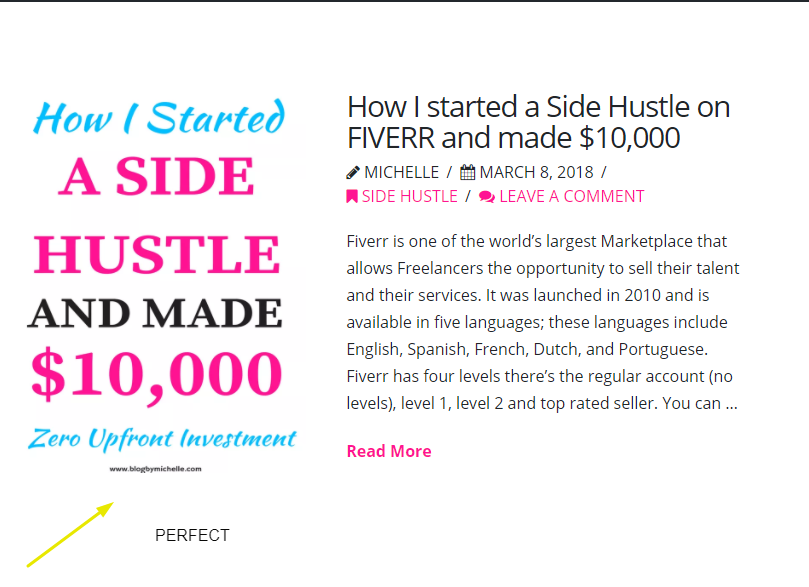
Help with my Featured images

When I add a featured image to my blog post, it looks like this https://twinsmommy.com/pin-images-pinterst/ ( A super large image above the post)

But I want it to look like this, before someone clicks to read more https://anastasiablogger.com/

This is how my blog post currently show up

Hi,

To achieve that, you can add this in Theme Options > CSS

@media (min-width: 768px) {
.blog .has-post-thumbnail {
    overflow: hidden;
    background-color: #fff;
    padding: 60px;
}
.blog .has-post-thumbnail .entry-featured {
    float: left;
    width: 40%;
    box-shadow: none;
    border: none;
}

.blog .has-post-thumbnail .entry-wrap {
    float: left;
    width: 60%;
    padding: 0 0 0 40px;
}
}

Hope that helps

Almost perfect, I now have the featured image on the home page but I do not want it on the post page

I don’t want it at the top

I only want it on the first page

This website is the perfect example of how I want it to be https://anastasiablogger.com/

P.S The image loads very slow, It shows black before it shows actual image, it also shows permalink when I hover over image

Hi again,

To remove the featured image from the single posts, add the following code as well:

.single-post .entry-featured {
    display: none;
}

Let us know how this goes!

It works, thank you

Glad it worked.

Cheers!

This topic was automatically closed 10 days after the last reply. New replies are no longer allowed.